Portable DNS Cache and Firewall
... to the download page for the innovative "Portable DNS Cache and Firewall" software, a cutting-edge product developed by the renowned Verigio Communications. This software is a must-have for tech-savvy ...

DNS Firewall is a Windows application for managing DNS-based domain restrictions. It loads rule files with wildcard patterns that allow or block matching names, making it easy to switch between different policies. Its built-in cache reuses resolved domain names, while Exclusive mode prevents queries to remote DNS servers and relies on locally cached results. Filtering remains active while the application runs, including when minimized to the system tray.
| Author: | Verigio Communications |
| License: | Demo |
| Price: | $19.95 |
| Released: | Sep 3, 2016 |
| File size: | 1.54 MB |
| Downloads: | 423 |
| Keywords: | local dns filtering, verigio, DNS Firewall, dns firewall software, Windows 10 compatible, block website domains, filtering, x64 software, wildcard dns rules, network protection, Verigio Communications, restriction, monitoring, cache, firewall, website, dns domain blocker, dns cache manager, internet security, blocking, domain, DNS, name |
| Author URL: | http://www.verigio.com |
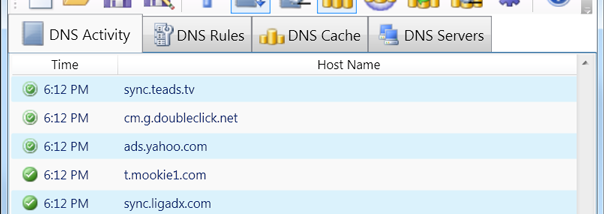

DNS Firewall is a Windows application for controlling which domain names can be resolved and for observing DNS-related activity. It is suited to users who want to block selected domains through locally managed rules, switch between different rule sets, or use a local DNS cache to reduce repeated lookups. Its controls are based on domain-name patterns rather than a collection of browsing or network-security tools.
Blocking rules use simple wildcard matching and can either allow or block matching DNS names. This lets users define broad or specific rules and keep different policies in separate files. To apply a policy, they load the file containing its rules; switching policies means loading another file. This file-based workflow is useful when different activities call for different domain restrictions, and it avoids having to rebuild a rule set each time.
The program also keeps its own DNS cache. After a domain name has been resolved, its result can be reused locally, so the same name does not need to trigger another query to a remote DNS server while the cached entry is available. An Exclusive mode takes this further by blocking attempts to contact remote DNS servers and requiring name resolution to use the local cache. This can be useful on a slow or unreliable connection, although it depends on the required names already being available locally; names absent from the cache cannot be resolved through a remote server while the mode is active.
DNS Firewall applies its rules and cache while the application is running. Minimizing it to the system tray keeps the filtering active in the background, while closing the application stops its functionality and restores normal DNS resolution without requiring manual reconfiguration. This makes it practical for temporary restrictions or monitoring sessions as well as longer periods of use, provided the application remains open.
The software is distributed as a demo and requires .NET Framework 4.0. Its interface and documentation are in English. The stated supported systems include Windows 10 along with several older Windows desktop and server editions; no support for Windows 11 is established here. DNS Firewall is focused on DNS name resolution, rule files, and caching, so it should not be treated as a general-purpose firewall that inspects all network traffic.