FastCube VCL
FastCube VCL by Fast Reports Inc is a powerful ... and visualize data effortlessly. With its intuitive interface, FastCube VCL makes it easy to build complex reports ...

FastCube is an OLAP component set for Delphi, C++Builder and Lazarus applications. It turns data from SQL queries or TDataSet-based sources into interactive summary tables, with configurable measures, figures, filters and calculations. Users can sort, collapse and highlight results, then save templates or export tables to Excel, Word and HTML. It also supports charting and printing through companion Fast Reports tools.
| Author: | Fast Reports, Inc. |
| License: | Trialware |
| Price: | $179.00 |
| Released: | May 21, 2024 |
| File size: | 14.50 MB |
| Downloads: | 399 |
| Keywords: | data cube component, fastcube reporting, software review, OLAP, interactive summary tables, report, delphi olap component, component, Fast Reports Inc, business intelligence, data analysis, report builder, fastcube olap, FastCube, generate report, olap report builder, desktop application, OLAP component |
| Author URL: | https://fast-report.com/ |
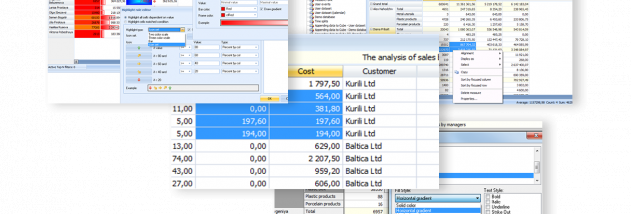



FastCube is a set of OLAP components for developers building data-analysis features into applications made with Delphi, C++Builder or Lazarus. It lets an application present large data arrays as interactive summary tables, so users can examine and compare information without writing code for each analysis. Developers can embed the components in an application's interface and configure cube settings through code or expose them for user control.
A cube can take data from a scheme or SQL query and connect through standard ADO or BDE components, as well as other sources based on TDataSet. Users can arrange measures across table rows, columns or different levels, and add as many figures as needed. Built-in calculations include counts, sums, minimums, maximums and averages; specialized functions can count unique values, return a first value or display a list of unique values. Date and time fields can be arranged automatically, and date, time and row values can also be used as figures.
Filtering and presentation tools help focus a table on relevant results. Filters can be applied to measure values or calculated figure values, while FastScript supports custom figures and calculated filters. Figures can display totals or percentages by row, column, group or for the entire table. Users can sort measurement levels or axes by their values or figures, control totals, collapse measurements or individual values, and highlight cells conditionally. Output formatting can govern both the display of figures and calculated filtering.
For repeat analysis, developers can prepare summary-table templates and restrict changes to a scheme when users should not alter its layout. Cube data and settings can be saved for later use or exchange in a compact format. Tables can be exported to Excel, Word or HTML, and selected ranges can be copied to the clipboard. Users can inspect and export details behind a cell; cube data can also be exported to several XML-based formats. Printing uses FastReport, while charts can be built with TreeChart.
FastCube is intended for developers who need embedded OLAP reporting and for application users who need to explore data through prepared tables rather than programming. It is trialware and supports Windows systems, including Windows 10 and Windows 11. Its role is as a development component, so it is used within compatible Delphi, C++Builder or Lazarus projects rather than as a general-purpose standalone spreadsheet or reporting application.