PDF Compare
Welcome to the home of PDF Compare, a cutting-edge software developed by the innovative BureauSoft ... files. It offers a straightforward, user-friendly way to compare two PDF files side by side, highlighting the ...

Florencesoft DiffEngineX compares formulas and constants in whole Excel workbooks or selected worksheets. It can align similar rows and columns after insertions, compare formulas directly or by calculated values, and group matching changes across adjacent cells. Reports can highlight differences in a new workbook or in color-coded copies of the originals, with separate colors for additions, deletions, and modifications. It also supports command-line use.
| Author: | DiffEngineX LLC. |
| License: | Trialware |
| Price: | $85.00 |
| Released: | Jul 25, 2022 |
| File size: | 58.20 MB |
| Downloads: | 190 |
| Keywords: | spreadsheet difference report, Windows 10 software, advanced Excel utility, excel formula comparison, workbook, DiffEngineX LLC, compare excel spreadsheets, compare, compare workbook sheets, highlight excel changes, excel workbook comparison, comparison, Excel comparison, compare workbook, report difference, Florencesoft DiffEngineX, Excel comparison tool, spreadsheet differences |
| Author URL: | https://www.florencesoft.com/ |
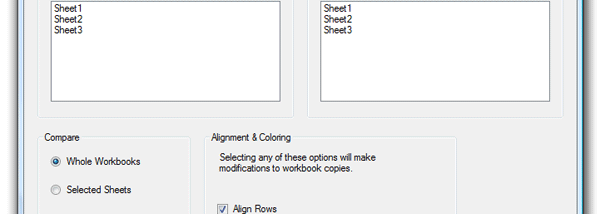

Florencesoft DiffEngineX compares the formulas and constant values in Microsoft Excel workbooks, helping spreadsheet users identify changes between saved versions. It can analyze two complete workbooks or selected worksheets, which is useful when reviewing updated models, reports, budgets, or other spreadsheets. Rather than relying only on cell addresses, it can align similar rows and columns when content has been inserted, making comparisons more meaningful after a workbook's layout changes.
The comparison can treat formulas as text or compare their calculated results. Direct formula comparison flags different expressions even when they currently produce the same value, while value-based comparison treats those cells as equivalent. This distinction helps reviewers choose whether they need to inspect changes in calculation logic or only changes in workbook output. DiffEngineX can also identify the portions of formulas and text constants that differ, providing more detail than a simple indication that a cell changed.
Results can be delivered as a difference report in a new workbook. For visual review, the program can create copies of the compared workbooks and color-code additions, deletions, and modifications. This keeps the comparison visible in the context of the original sheets, rather than requiring every change to be interpreted from a list of cell references. An option removes existing unconditional fill colors before applying comparison highlights, helping the new markings stand out.
When a workbook contains repeated formulas across adjacent cells, individual reports for every cell can obscure the overall change. DiffEngineX can group like changes in contiguous cells and report them as one range-level change. This is particularly useful in financial models, where formulas across a block may follow the same pattern but use different relative cell references. Comparisons can be run through the graphical interface or from the command prompt, supporting both occasional manual checks and repeatable workflows.
DiffEngineX is trialware for Windows, with support listed for Windows 10 and Windows 11 as well as earlier Windows releases. Its tools are intended for comparing Excel workbook contents; the key review options are formula-versus-value comparison, row and column alignment, grouped range reporting, and color-coded output. The software is useful when spreadsheet revisions need closer inspection than a basic cell-by-cell comparison can provide.