Fresh View for Windows 10 - Full description
Fresh View is a multimedia file organizer and viewer for browsing image, audio, and video files in folders. It is suited to users who want a single desktop application for viewing pictures, playing media, and sorting through collections without opening each image separately. Its gallery-style browsing and support for a broad range of file types make it useful for personal photo libraries and mixed media folders.
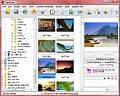
For image browsing, Fresh View can display files in several views, including thumbnails that show a folder's pictures at a glance. This helps users scan large collections and select images to open or print. Graphics can also be shown as a slide show, providing a straightforward way to view a set of pictures in sequence. The program supports 86 formats across its supported media categories, including common image types such as JPEG, GIF, PNG, TIFF, and BMP, as well as formats used by graphics applications and scanners.
Fresh View also handles audio and video playback, so users can listen to music and watch movies from within the same multimedia workflow. Its listed video formats include AVI and MPEG-family files. For images, it offers conversion between graphics formats, printing, and the creation of HTML albums. An HTML album gives users a way to assemble images into a collection that can be viewed through a web browser, rather than keeping the collection solely inside the program.
The format support extends to icon-related resources as well as still images and video. Fresh View can read Windows icons and cursors, animated cursors, icon libraries, and icon resources found in executable and DLL files. This can help when browsing graphics stored in application files, alongside regular picture folders. Supported image formats include specialist and older types such as Photoshop, TGA, PCX, SGI, Kodak Photo-CD, and portable bitmap family files, making the program relevant to users with varied or legacy collections.
Fresh View is freeware from Fresh Devices. It supports Windows 10, along with a range of earlier Windows releases; Windows 11 support is not established here. Its combination of folder-based browsing, playback, conversion, printing, and album creation is best suited to basic multimedia organization and viewing rather than advanced image editing or dedicated media-library management.