CorelDRAW X7 (x32 bit)
CorelDRAW Graphics Suite X7 is a graphic design program ... drawing and layout work. Its main applications include CorelDRAW for vector graphics and page composition, and Corel ...

CorelDRAW is a graphic design application for vector illustration, page layouts, and visual assets. LiveSketch converts freehand input into vector curves, while editable node shapes help refine lines and objects. Touch workspaces and stylus controls support drawing on compatible devices, and users can import selected workspace elements from older CorelDRAW and PHOTO-PAINT setups. The suite also includes bitmap-image editing tools.
| Author: | Corel Corporation |
| License: | Trialware |
| Price: | $499.00 |
| Released: | Mar 5, 2024 |
| File size: | 1.70 MB |
| Downloads: | 2098 |
| Keywords: | livesketch drawing, graphic editor, Layout capabilities, bitmap image editing, CorelDRAW, Typography tools, Vector illustration, graphic, graphic design software, Photo editing, Graphic design, Corel, vector illustration tool, Web graphics tools, coreldraw trial, bitmap creation, Corel DRAW, vector graphics editor |
| Author URL: | https://www.corel.com/en/ |
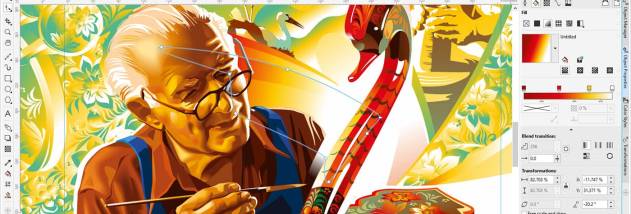



CorelDRAW is a graphic design application for creating vector illustrations, page layouts, and other visual materials. It is used by illustrators, designers, and small businesses to build artwork that can be resized without losing sharpness, as well as designs for print and digital projects. The broader graphics suite pairs vector work with bitmap-image editing, giving users tools for different stages of a design workflow.
The LiveSketch tool turns freehand strokes made with a mouse, touch input, or a compatible stylus into vector curves. This lets artists develop an idea directly on the screen rather than drawing it on paper and scanning it first. Curve editing is supported by identifiable node shapes for smooth, cusp, and symmetrical points, helping users select and adjust parts of a line or object with greater precision.
Touch-oriented controls provide a more compact workspace for tablet use, with commonly used commands kept accessible and gestures for panning and zooming. Stylus support can use pressure, tilt, bearing, and rotation to influence tools and effects, making strokes more expressive than standard mouse input. Native support for Microsoft Surface devices and Surface Dial controls also makes the interface adaptable to different drawing setups.
Designers who are moving from an earlier CorelDRAW or Corel PHOTO-PAINT setup can import selected workspace elements from older workspaces, then add them to the current interface or create a separate configuration. This helps preserve familiar tool arrangements while allowing the workspace to be adjusted for a new workflow. Startup guidance and in-product learning help new users explore the tools, while workspace customization can keep frequently used commands close at hand.
CorelDRAW is suited to illustration, graphic composition, and preparing visual assets for print or screen. The software is trialware and is offered for 64-bit Windows 10 and Windows 11. Its touch and stylus features are most useful on compatible hardware; conventional mouse-and-keyboard input remains an option for standard desktop workflows.