Umile Encoder
... the world of seamless media conversion with Umile Encoder, an innovative software developed by Technonia Inc. This Windows 10 compatible software is a game-changer in the realm of ...

GOM Video Converter converts video files playable in GOM Player, except SWF, into formats such as MKV, AVI, MP4, FLV, WMV/ASF, OGM, and 3GP. It can embed subtitles, extract audio to MP3, and convert selected clips. Output options suit phones, portable players, consoles, and web use, with two-pass encoding for higher-quality video.
| Author: | GOM & Company |
| License: | Demo |
| Price: | $35.00 |
| Released: | Apr 16, 2020 |
| File size: | 27.10 MB |
| Downloads: | 349 |
| Keywords: | player, video encoder, Video2phone, encoder, video to mp4, video converter, Windows 10 compatible, embed subtitles in video, encode, extract mp3 from video, convert video, video encoding, GOM & Company, GOM Video Converter, video to avi, convert video for devices, converter, x64 architecture, multimedia software, video |
| Author URL: | https://www.gomcorp.com/eng/ |
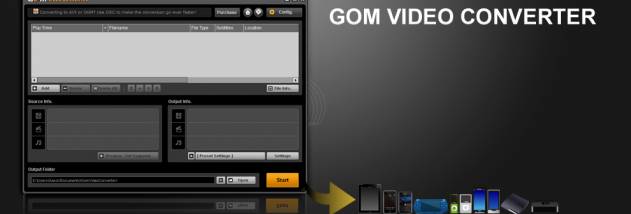

GOM Video Converter is a desktop video and audio conversion utility for people who need to prepare media for portable players, phones, game consoles, websites, or other devices. It works with video files that can be played in GOM Player, except SWF files, and converts them into formats suited to different playback environments. Rather than requiring the original video to be in a particular format, the program uses its playable source files as input and lets users choose a more appropriate output format.
The available output formats include MKV, AVI, MP4, FLV, WMV/ASF, OGM, 3GP, and MP3. These formats support varied use cases: MP4 and 3GP conversions are intended for phones, iPods, and PSP or PS3 systems; AVI can be used for portable media players and DivX players; and WMV is suited to web pages and blog posts. The converter can also create OGM or AVI files for PDA playback and FLV files for Flash-based use. The choice of output format helps make a video usable on equipment or services that may not accept its original encoding.
For videos whose subtitles are stored separately, GOM Video Converter can embed subtitle text into the converted picture. This is useful on devices that play video but cannot load subtitle files on their own. The program can also extract audio from a video and save it as an MP3, or convert only selected segments instead of processing the entire recording. Segment conversion can reduce unnecessary output when only a particular scene, lesson, or excerpt is needed.
Encoding controls address both playback and processing time. A playback-speed change function can speed up video lectures and other recordings, with faster playback also resulting in faster encoding. Two-pass encoding is available for creating higher-quality video, while the program also provides stable WMV encoding for files such as online lecture videos. Conversion speed can benefit from dual-core, quad-core, or hyper-threaded processors, making it more practical to handle longer recordings on suitable hardware.
GOM Video Converter is intended for Windows and its stated operating-system support includes Windows XP through Windows 10, including listed 64-bit editions of Vista, Windows 7, and Windows 8. Windows 11 support is not established here. The software is offered as a demo. Its mix of format conversion, subtitle embedding, audio extraction, and clip selection makes it suitable for preparing personal videos, lectures, and other media for devices with different playback requirements.