HippoEDIT x64
HippoEDIT is a 64-bit Windows text and source code ... insert recurring code structures. For reading and navigating source, HippoEDIT offers code outlining, scope indication, changed-line markers, brace ...

HippoEDIT is a Windows text and source code editor for programmers and power users. It provides tabbed documents, File Explorer and Project Explorer panels, syntax highlighting for many languages, auto-completion, code hints, templates, and customizable shortcuts. Code outlining and brace highlighting aid navigation, while search, multiple undo, encoding support, clipboard tools, and print preview support everyday editing tasks.
| Author: | HippoEDIT.com |
| License: | Trialware |
| Price: | $39.95 |
| Released: | Sep 1, 2017 |
| File size: | 2.92 MB |
| Downloads: | 390 |
| Keywords: | html code editor, editor, text editing, syntax, code folding, source code editor, text editor, edit, Windows 10 compatible, HippoEDIT, syntax highlighting, syntax highlighting editor, programming text editor, text editor for programmers, syntax highlight, code auto completion, software review |
| Author URL: | http://www.hippoedit.com/ |
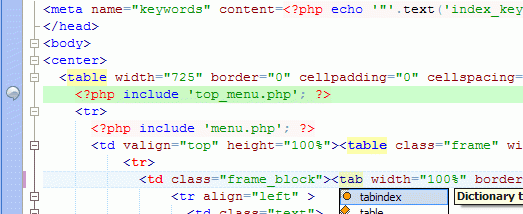

HippoEDIT is a Windows text and source code editor aimed at programmers and other users who work with structured text. Its tabbed interface brings multiple documents together, while built-in File Explorer and Project Explorer panels help browse files and organize project work. The interface supports different schemes, and integrated web and help browsers keep reference material close to the editing workspace.
The editor includes syntax highlighting for languages such as PHP, HTML, Perl, Java, Pascal, C and C++, XML, and XSLT. Language definitions can be embedded or inherited, allowing mixed-language files such as HTML containing JavaScript, PHP, or CSS to receive appropriate highlighting. Users can also add language support through syntax definition files. For routine coding, HippoEDIT offers auto-completion based on syntax dictionaries and document statistics, contextual code hints, and a template engine with built-in tags. More than 300 commands provide editing and navigation operations, with customizable keyboard shortcuts for adapting the editor to established workflows.
Code navigation and review features include outlining, current-scope indication, markers for changed lines, brace mismatch highlighting, and indentation guides. These cues make it easier to scan long files, understand nested structures, and locate edits. Search and replace tools handle text changes across documents, while multiple undo and redo steps allow users to backtrack through editing sessions. Formatting rules can be tailored to programming languages, and support for different text encodings helps when opening files created in varied environments.
HippoEDIT also supports drag-and-drop for text and files, plus a clipboard ring for accessing earlier copied items. It can preserve syntax highlighting when copying code into other applications and can paste highlighted code as HTML into the editor. WYSIWYG print preview lets users check how documents will appear on paper. External tool integration adds another way to connect editing tasks with other utilities, while the tabbed workspace keeps the main editing flow in one application.
The editor suits programmers maintaining source files, web developers working with mixed HTML and scripting languages, and power users who want customizable text-editing commands. HippoEDIT is trialware. The stated operating system support includes Windows versions through Windows 10; Windows 11 support is not established here.