TouchCopy
... application for browsing and transferring content from an iPhone, iPad or iPod to a computer. It is ... handling the device's contents as a single backup file. For music, TouchCopy can copy tracks and playlists from ...

iExplorer lets Windows users browse files and folders on an iPhone, iPod touch or iPad through a desktop interface resembling a removable drive. Drag and drop files between the computer and device, or create, rename and delete accessible folders and files. It can also use an iPhone or iPod touch as portable storage. Optional root access on jailbroken devices can expose data such as contacts, SMS and email. The program is offered as a demo.
| Author: | Macroplant LLC. |
| License: | Demo |
| Price: | $39.99 |
| Released: | Oct 17, 2022 |
| File size: | 543 kB |
| Downloads: | 485 |
| Keywords: | iPhone manager tool, iPhone, file, file transfer utility, Macroplant LLC, flash drive, iPhone browser, x64 software, iPhone manager, iExplorer, explorer, iphone flash drive, Apple device, Windows 10 compatible, browser, transfer files iphone, folder, iphone file manager, ipod touch file manager, iphone file browser, browse iphone folders |
| Author URL: | https://macroplant.com/ |
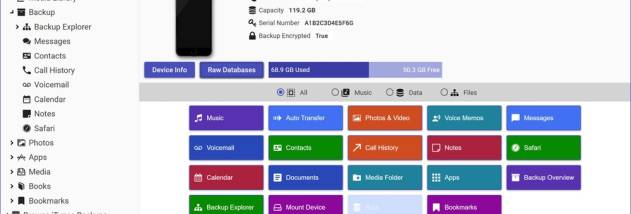

iExplorer is a file browser and device-management utility for iPhone, iPod touch and iPad owners who want to work with device files from a Windows computer. It presents the connected Apple device's folders in an interface similar to a removable drive, making it possible to browse its contents and manage supported files without relying on a traditional file manager on the device.
Its central feature is drag-and-drop file transfer. Users can copy files and folders between the computer and the connected device by dragging items in either direction. The browser also provides tools to create, delete and rename files and folders, which is useful for organizing device storage directly from Windows. The familiar folder view helps make these tasks straightforward for people accustomed to working with USB drives and desktop file explorers.
The software can also let an iPhone or iPod touch act as a flash drive, providing a way to carry files on the device and access them from a computer. For devices that have been jailbroken, iExplorer offers optional access to the device's root file system. That deeper access can be used to inspect additional data, including address book entries, SMS messages and email, though these capabilities depend on the device and its configuration.
Typical uses include transferring files, organizing accessible folders, browsing an Apple device's contents and using its storage to carry files between computers. The simple browser-and-transfer approach is aimed at users who prefer to manage files from Windows rather than navigate them on a mobile device. It is also relevant when a user needs to inspect data beyond the standard file areas, provided the device has been jailbroken.
iExplorer is a demo application for Windows 7, Windows 8, Windows 10 and Windows 11. The available feature set can vary according to the connected device and whether it is jailbroken. Users should connect their Apple device to the computer before browsing or transferring content, and should take care when changing or deleting files because altering device folders can affect stored data or device behavior.