iTop Data Recovery for Windows 10 - Full description
iTop Data Recovery is a Windows file-recovery utility for people who have lost or deleted files through accidental deletion, a formatted drive, a system crash, or another data-loss event. It searches locations such as the Recycle Bin, internal hard drives and SSDs, external disks, USB drives, memory cards, and digital cameras. The program can look for documents, photos, videos, music, system files, and other data, helping users identify files that may still be recoverable before restoring them.
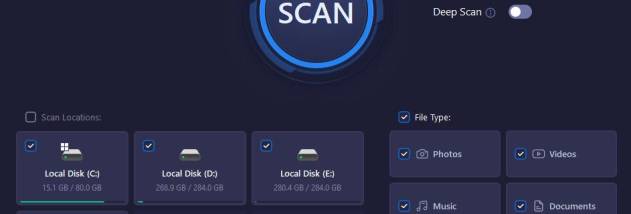
A recovery session begins by selecting the storage location and the file types to search. A scan then produces a list of found files with details including their names, original locations, and sizes. iTop Data Recovery also gives each result an assessment of its recoverability, which can help prioritize files when a scan returns many items. A preview is available before recovery, allowing users to inspect supported data and select the files they actually need rather than restoring the entire result set.
For a more thorough search, Deep Scan examines the selected location in greater depth and may find additional lost data. This can be useful when a regular scan does not locate a needed file, although successful recovery depends on the state of the storage device and whether lost data has been overwritten. The software also includes a backup function for important files and folders. Keeping a separate copy can reduce the impact of a future deletion or drive problem, while recovery scans address data that has already gone missing.
iTop Data Recovery is suited to home users dealing with common loss scenarios, including an emptied Recycle Bin, accidental formatting, malware or virus damage, and mistakes during file handling. Its location and file-type choices narrow the search, while file details, recoverability assessments, and previews support decisions before restoration. It can also scan removable media, making it relevant for retrieving photos or other files from memory cards and USB storage as well as from computer drives.
The program is freeware and runs on Windows 7, 8, 8.1, 10, and 11. Its stated minimum requirements are a 1 GHz processor, 1 GB of RAM, and 1,000 MB of free disk space. For better chances of retrieving deleted files, users should avoid saving new data to the affected drive before scanning, since new writes can overwrite the space that the missing files occupied. Recovery results are not guaranteed, particularly when storage has been heavily used or damaged.