JD-GUI for Windows 10 - Full description
JD-GUI is a graphical Java decompiler for developers, analysts and others who need to inspect compiled Java programs. It reconstructs readable Java source from .class files, making it possible to examine code when the original source files are unavailable. Rather than working only from a command line, users can browse the decompiled output in a desktop interface and move between classes, methods and fields.
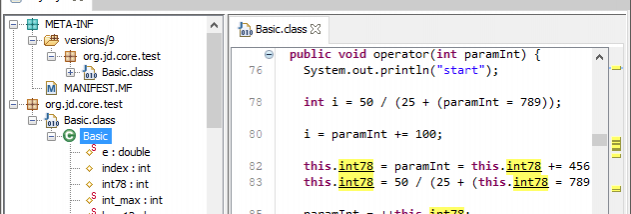
The program can open compiled class files and Java archives, including JAR files, so users can inspect individual components or explore the contents of a packaged application. A navigation pane helps locate classes in an archive, while the source view shows the decompiled code for the selected class. Selecting methods and fields provides a direct way to move through a class without searching manually through the entire file. This is useful for understanding how an unfamiliar library is structured or tracing a particular operation through its code.
Decompilation reconstructs source-like code from Java bytecode; it does not recover the original source files or guarantee that the result matches the original formatting, names or comments. The reconstructed output is intended for reading and analysis. It can help with code review, learning how a library works, investigating compatibility issues, and examining legacy programs for which source code has been lost. Developers can also use it to inspect dependencies before integrating them into a project.
JD-GUI is a standalone graphical utility, so it offers a focused workspace for opening and browsing compiled Java code without requiring a full development environment. It is freeware and may be used for personal needs in commercial or non-commercial settings, but it cannot be embedded in commercial software products. Its Windows editions include support for Windows 10 and earlier Windows releases. The interface is centered on browsing and viewing reconstructed code, making the program suited to inspection rather than editing or rebuilding Java projects.