Karaoke Builder Studio
Karaoke Builder Studio is a karaoke authoring program for creating CD+G tracks, with tools ... lyrics and synchronizing them to music. It serves karaoke hosts who want to prepare custom song selections, ...

Karaoke Trainer helps karaoke performers and solo singers practice with MP3 tracks. It can reduce the original vocal, display lyrics embedded in a song, and record a replacement performance. Tempo can be changed without affecting pitch, or the song can be transposed while keeping its tempo. Recordings can be saved as MP3 or WAV for further mixing.
| Author: | Fast&Soft |
| License: | Trialware |
| Price: | $15.95 |
| Released: | Sep 29, 2009 |
| File size: | 348 kB |
| Downloads: | 204 |
| Keywords: | interactive interface, midi, x64 software, transpose karaoke songs, music learning tool, Windows 10 compatible, karaoke, train karoke, record karaoke vocals, MIDI karaoke, karaoke practice software, remove vocals from mp3, learner, mp3 karaoke trainer, karaoke song, change song tempo, Fast&Soft, Karaoke Trainer |
| Author URL: | https://www.earpower.com/ |
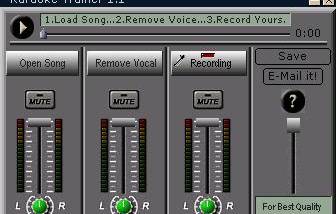

Karaoke Trainer is a practice and recording tool for singers who want to work with MP3 backing tracks. It is aimed at karaoke performers and solo artists who need to rehearse songs, adjust them to suit their voice, or make a vocal recording without relying on a separate audio editor.
Load an MP3 and use the vocal-removal feature to reduce or remove the original singing, creating a track for practice or recording. The result depends on the source audio, since vocals and instruments can share frequencies and stereo positions. When lyrics are embedded in the MP3, Karaoke Trainer can display them during playback; otherwise, the track can still be used without on-screen lyrics. Sing along with the altered track to rehearse timing and phrasing, or record a new vocal part in place of the original.
The program can save a performance as a compressed MP3 for convenient playback and sharing, or as a WAV file for further mixing in another audio application. Tempo adjustment changes playback speed without changing pitch, which can help when learning a difficult passage or practicing at a more manageable pace. Transposition shifts the song to a different key while keeping its tempo, letting singers try a track in a range that better fits their voice.
A typical session involves loading a song, reducing its vocal part, adjusting speed or key if needed, and singing along or recording a replacement vocal. The saved WAV can then be taken into a more advanced editing or mixing workflow, while MP3 provides a compact finished practice recording. These tools make the software useful for learning songs, preparing karaoke performances, and making basic vocal demos from existing tracks.
Karaoke Trainer is trialware from Fast&Soft for Windows. It is a small application designed for MP3-based practice, with output options for MP3 and WAV. Vocal removal is intended for suitable song recordings and may not completely isolate the accompaniment in every track; embedded lyrics are available only when present in the MP3 file.