Advanced SMTP Server
Advanced SMTP Server is a local mail-transfer program for Windows that ... for individuals and organizations that need an outbound SMTP service for desktop email, newsletters, mailing lists, customer notifications ...

MailEnable Professional is a Windows mail server for small and medium-sized organizations. It adds webmail, web administration, IMAP4, enhanced anti-spam features and third-party antivirus scanning to the Standard Edition. Users can access mail through SMTP, POP, IMAP or a browser, and administrators can manage services centrally. Webmail includes calendars, contacts, tasks, folders and POP retrieval, while WebDAV exposes a mailbox file area as network storage.
| Author: | MailEnable |
| License: | Trialware |
| Price: | FREE |
| Released: | Feb 6, 2025 |
| File size: | 138.00 MB |
| Downloads: | 1202 |
| Keywords: | webmail services, anti-spam filters, x64 software, POP3 retrieval, email server, email server solution, SMTP service, imap mail server, pop mail retrieval, smtp server, calendar synchronization, webmail server, mail server software, console, webmail, monitor, business email server, MailEnable Professional |
| Author URL: | https://www.mailenable.com/ |
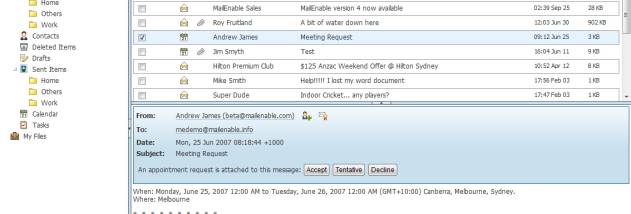



MailEnable Professional is a Windows mail server for small and medium-sized organizations that need to host email and provide users with several ways to access their mailboxes. It builds on the Standard Edition with webmail, web administration, IMAP4, enhanced anti-spam features and support for third-party antivirus scanning. Administrators can manage mail services centrally, while mailbox owners use browser-based or compatible email clients to work with their messages.
The server supports SMTP for sending and receiving mail, as well as POP and IMAP access. Its AJAX webmail client lets users read and organize messages through a browser, with folders, HTML viewing, multiple character sets, spell checking and multilingual capabilities. Calendars, contacts and tasks are available alongside email. Users can also set up POP retrieval in webmail to collect messages from other POP accounts and deliver them to their MailEnable mailbox, keeping mail from multiple accounts accessible in one place.
Web administration provides browser-based access to administrative functions. For integration with other systems, a configuration API allows external applications to control and extend MailEnable; documentation and sample applications support development work. WebDAV support makes a mailbox owner's My Files folder available as a network drive, so documents and photos can be stored or accessed with compatible clients on a computer or phone. ActiveSync support synchronizes email and other changes between the server and compatible mobile devices using push rather than repeated polling, and is designed to limit mobile data transfer.
MailEnable Professional can serve organizations that host email for staff, need browser access for users away from their desks, or want to consolidate mail retrieved from external POP accounts. Its range of protocols also supports mixed environments where users have different email clients or access habits. Third-party antivirus scanning and anti-spam controls add mail-management options for administrators, while calendars, contacts and tasks give users additional tools within webmail.
The software is trialware and runs on Windows 10 and Windows 11, as well as Windows Server editions from 2008 through 2022. Exchange ActiveSync is licensed separately per mailbox per year. Mail services, webmail, WebDAV storage and external integrations are intended to be configured and operated as part of a hosted mail server, rather than as standalone desktop email software.