BD3D2MK3D
BD3D2MK3D, developed by the talented r0lZ, is a powerful and intuitive tool designed for enthusiasts of 3D Blu-ray conversion. This software stands out in the realm ...

MakeMKV converts DVD, Blu-ray and UHD Blu-ray discs into MKV files while retaining the source video rather than re-encoding it. Users can select titles and tracks, choose an output folder and preserve audio, subtitles, chapters and track metadata. It is suited to digitizing disc collections and creating files for compatible media players or servers.
| Author: | GuinpinSoft inc |
| License: | Trialware |
| Price: | $60.00 |
| Released: | Jan 24, 2026 |
| File size: | 14.90 MB |
| Downloads: | 520 |
| Keywords: | makemkv disc converter, Blu-ray conversion, Video Encoder, preserve dvd subtitles, uhd blu-ray backup, Video Converter, Converter, DVD decryption, disc to mkv converter, Video to MKV, dvd to mkv, GuinpinSoft Inc, Video2MKV, video format conversion, streaming, Convert, blu-ray to mkv, MakeMKV |
| Author URL: | https://www.makemkv.com/?__c=1 |

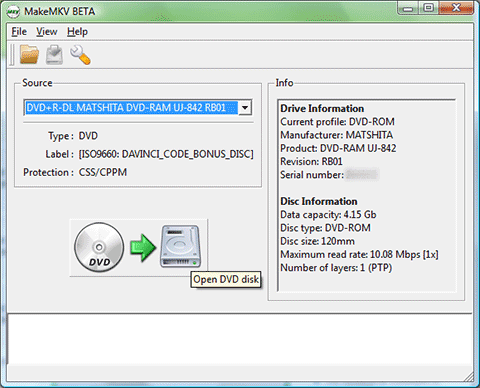
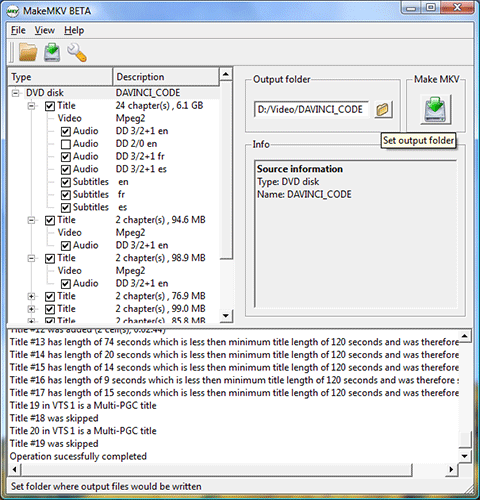

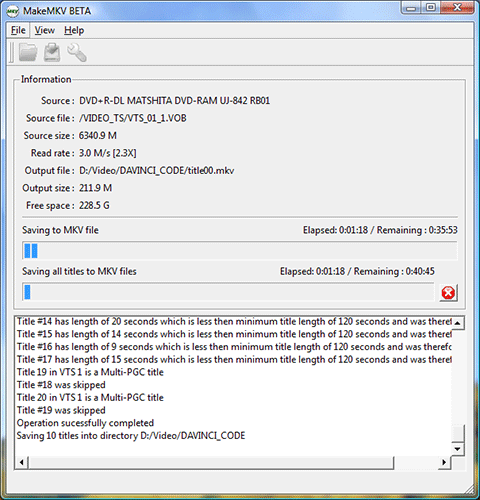


MakeMKV is a disc conversion and backup utility for people who want to store DVD, Blu-ray and UHD Blu-ray video on a computer or media server. It reads a disc and saves selected titles in the MKV container, creating files that are easier to manage and play with compatible media software. The conversion keeps the source video rather than re-encoding it, which helps preserve the original picture quality and avoids an extra encoding step.
After a disc is opened, MakeMKV scans its contents and displays the available titles and tracks. Users can choose which titles to save, set an output folder and start the conversion. This selection is useful for leaving out extras or unwanted material instead of copying every item on a disc. The program can retain multiple audio tracks and subtitles, so a resulting file can keep language options and other track choices from the source.
The output can also preserve chapter information and track metadata, including language details. Keeping these elements makes it easier to navigate long videos and identify the contents of a file later. MakeMKV focuses on conversion to MKV rather than offering a broad set of editing tools or output formats; it is intended for making disc content accessible as digital files, not for trimming footage, adding effects or compressing it through a new encode.
This workflow suits home media libraries, personal disc backups and users who prefer to play video from storage rather than repeatedly use physical discs. Selecting only the needed titles and tracks can reduce the amount of material copied, while retaining the original video avoids quality loss caused by re-encoding. Playback depends on whether the chosen media player or device supports MKV and the included audio and subtitle formats.
MakeMKV is trialware and is available for Windows, including Windows 10 and Windows 11. It also runs on macOS and Linux. Disc reading and conversion depend on a compatible optical drive and readable media; processing time and storage requirements vary with the disc and computer. The software works with DVD and Blu-ray formats, including UHD Blu-ray, and does not require an internet connection for its core conversion process.