Nero 7 Ultra Edition
... people who want to burn discs, organize personal media and create photo or video projects on a ... finished project to disc. Nero Home provides a media-library interface intended for browsing content on a PC ...

MediaCodeSpeedEdit modifies DVD writer firmware media codes and recording strategies. Users can rename an existing media code, import a code from DVD Identifier output, swap a code to an alternative write strategy, and adjust writing-speed limits. It supports several firmware formats and a range of LiteOn, Benq, Philips, HP, LG, NEC, Pioneer and other DVD writer models. Renaming replaces an existing code rather than adding a new entry.
| Author: | ala42 |
| License: | Freeware |
| Price: | FREE |
| Released: | Dec 28, 2016 |
| File size: | 195 kB |
| Downloads: | 257 |
| Keywords: | dvd read speed patch, dvd firmware patcher, write, change write speed, dvd write speed utility, media, patch firmware, Windows 10 compatible, firmware modification tool, ala42, firmware, Media code, media code editor, DVD burning software, MediaCodeSpeedEdit, x64 architecture, dvd firmware editor, dvd strategy swapping |
| Author URL: | http://ala42.cdfreaks.com/MCSE/ |
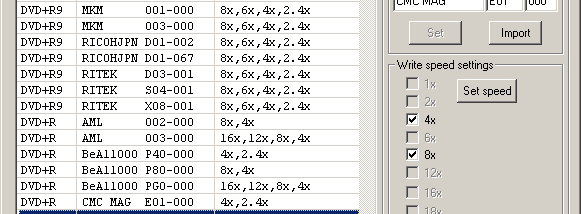

MediaCodeSpeedEdit is a firmware utility for working with DVD writer media codes and recording strategies. It is intended for users who need to adjust how a supported drive handles particular recordable media, especially when changing write-speed limits or testing an alternative strategy. The program edits firmware files rather than serving as a general disc-burning application, so its use involves matching the firmware and drive type before making changes.
The utility can rename a media code already present in the firmware to a different code. The replacement name can be typed in or imported from DVD Identifier output, which helps preserve special characters in the code. This method does not add a truly new media-code entry: it takes over an existing one, removing the original name from the patched firmware. As a result, the firmware may no longer apply its former handling to media identified by that original code.
For supported firmware, MediaCodeSpeedEdit also lets users swap the write strategy associated with a media code. The available strategies appear in a selection list after the code is opened, and a faster alternative can be chosen where one is available. Some firmware types allow this swap without changing the media-code name; others require renaming codes and can make the displaced code unusable. The program can also adjust DVD writing-speed limits, export media-code and speed tables to text files, and apply DVD read-speed patches for certain Benq and LG drive firmware types.
Firmware support covers all LiteOn models and many Benq, Philips, HP, LG, NEC and newer Pioneer DVD writer firmware types, along with selected Cyberhome, BTC, Gigabyte, Samsung and Artec models. It can work with several firmware formats, including raw BIN and HEX files, CVT files, and supported manufacturer EXE packages or flashers. Strategy swapping without renaming is available for specific Benq, NEC and Pioneer firmware families; support for a manufacturer or file format does not imply that every model or firmware is compatible.
MediaCodeSpeedEdit is freeware for Windows. Its published operating-system support includes Windows versions through Windows 10; Windows 11 support is not established here. Firmware modification can affect drive behavior, and changes should be made only to firmware intended for the exact drive. Users should retain an unmodified firmware copy and verify that a chosen strategy and media code are appropriate before applying a patch.