Windows 10
Windows 10 is Microsoft’s desktop operating system for personal computers, ... workloads depend on appropriate management, software and hardware. Windows 10 updates deliver fixes and refinements without necessarily changing ...

MessagePop is a lightweight Windows utility that displays a custom message in an always-on-top window. Users pass the message body as a command-line argument and can also set the window title and button label using hash-separated text. The single-button prompt can be dismissed with Enter or Escape, and the program can be launched by a scheduled task for recurring reminders or notices. It is freeware.
| Author: | Nitemice |
| License: | Freeware |
| Price: | FREE |
| Released: | Oct 29, 2015 |
| File size: | 10 kB |
| Downloads: | 340 |
| Keywords: | custom message box utility, command line message, x64 software, customizable pop-up messages, Windows 10, personalized notification window, windows message display tool, desktop notifications, MessagePop, Nitemice, generate, command line message popup, message, generate message window, always on top message window, scheduled task reminder popup, personalize message, personalize |
| Author URL: | http://www.nitemice.net |
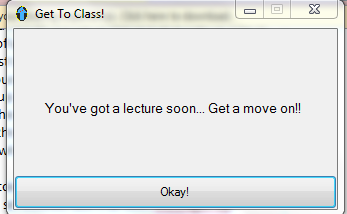
MessagePop is a small Windows utility for displaying a custom message in a window that stays above other open windows. It is intended for simple reminders, prompts and notices that need to remain visible until someone acknowledges them. Rather than opening an editor or configuring a larger notification system, users provide the message and optional display text as command-line arguments.
The message body is the main argument. Additional text can set the window title and the label on its button, with each value separated by a space, hash symbol and another space. This lets a command specify all three parts at once, such as a reminder with a descriptive title and a custom acknowledgement button. If a title is not needed, the argument format can skip it while still supplying button text.
The always-on-top window keeps the notice visible over other applications, which is useful when a timed task should interrupt routine work or when a short instruction needs to be noticed. The single-button layout keeps interaction straightforward: the user can dismiss the message by clicking the button, pressing Enter or pressing Escape. The button label can be customized to suit the prompt, such as indicating acknowledgement or completion.
MessagePop can be launched directly or called by a scheduled task, making it suitable for recurring reminders and other automated, local notifications. Because its content is supplied at launch, separate commands can display different messages without changing the program itself. It is a focused tool for displaying text rather than a general messaging client or a full notification-management system.
The program is freeware and is designed for Windows. Its operation depends on passing the desired text in command-line arguments; the message, title and button label therefore need to follow the separator format. The available compatibility information covers older Windows releases, so support on Windows 10 and Windows 11 should be confirmed before relying on it in those environments.