SUMo Portable
SUMo Portable, short for Software Update Monitor, checks installed ... scan and review update status in one place. SUMo reports available updates; it acts as an update ...

SUMo (Software Update Monitor) scans a Windows PC to identify installed applications and check whether newer versions or patches are available. It gives users a central view of software that may need attention before they open each program. An ignore list limits tracking to selected applications, and a setting controls whether beta versions are included. SUMo is freeware for Windows 10 and 11, as well as earlier Windows releases.
| Author: | KC Softwares |
| License: | Freeware |
| Price: | FREE |
| Released: | Aug 18, 2023 |
| File size: | 3.80 MB |
| Downloads: | 1600 |
| Keywords: | check software versions, KC Softwares, Software Update Monitor, checker, software updater, system optimization, SUMo software, software update checker, software patch checker, update checker, update, installed software updater, x64 architecture, windows update checker, check, Windows 10 compatibility, check for update, program update monitor |
| Author URL: | https://kcsoftwares.com/ |

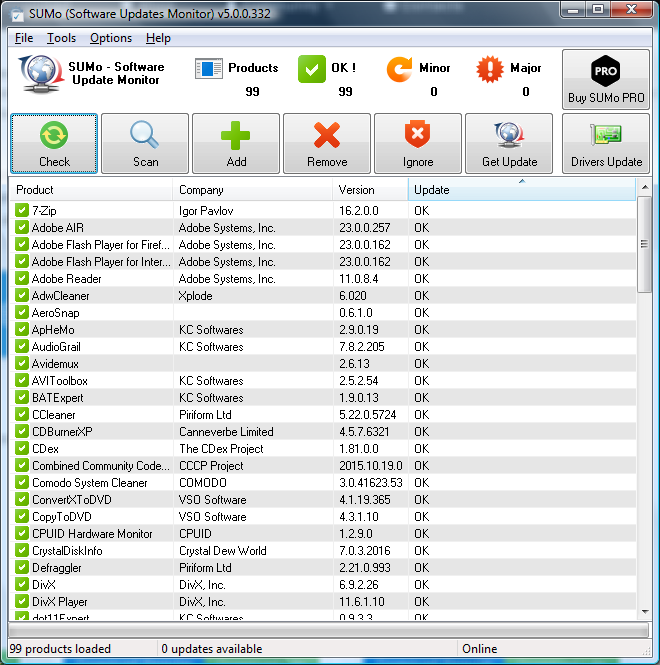



SUMo, short for Software Update Monitor, checks installed applications for newer software versions. It is intended for Windows users who want a central way to review update availability instead of opening each program and checking its settings or website separately. SUMo reports when an application may need an update before the user launches it, making it useful for occasional maintenance as well as routine checks across a PC with many installed tools.
The program scans the system and detects installed software automatically. It compares the detected applications with available version information and identifies updates or patches that may apply. The resulting overview helps users decide which programs need attention, while keeping the process focused on checking rather than requiring them to inspect every application individually. SUMo is an update monitor; its central role is to identify available updates, not to replace the applications being monitored.
Users can tailor what appears in the results. An ignore list excludes software they do not want SUMo to track, which can keep checks relevant when some applications are intentionally left unchanged or are not important to the user. A setting for beta versions lets users choose whether to include prerelease builds in update checks. This is useful for separating stable-release maintenance from testing newer software, depending on how the PC is used.
SUMo suits home users and others who install a variety of desktop applications and want a single place to spot outdated versions. The scan can reduce the effort of keeping track of software individually, while the ignore and beta options provide a way to refine the results. Internationalization support makes the interface available for use in multiple languages. Users can review the detected update information and decide how to proceed with each application.
SUMo is freeware for Windows, including Windows 10 and Windows 11. It also supports earlier Windows releases, including Windows XP, Vista, 7 and 8. Because it checks applications installed on the computer, the software list depends on what the scan can detect; users can then use the results to guide their own update process. SUMo is intended for update monitoring, not as a general-purpose security or system-cleaning tool.