Microsoft OneNote 2016 for Windows 10 - Full description
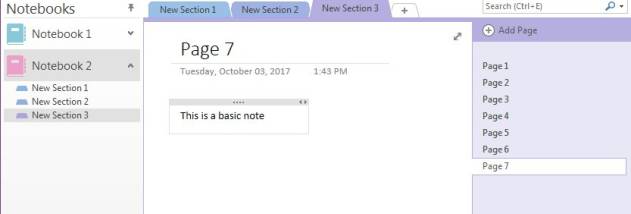
Microsoft OneNote 2016 is a digital notebook for collecting and organizing notes, reference material and task lists at home, school or work. It suits students, office teams and anyone who wants to keep varied information together instead of spreading it across paper notes and separate files. Notebooks can be divided into sections and pages, giving projects, subjects or areas of life their own structure while keeping related material in one place.
Notes can include typed text, images, audio and video, so a page can hold more than plain writing. Users can capture ideas as they arise, add supporting material and arrange it alongside the relevant notes. The flexible page layout is useful for combining written explanations with visual references, while to-do lists help track small tasks within a notebook. Recent notes provide a quick route back to pages that have been used lately, and search helps locate information without manually browsing every section.
OneNote can store notebooks on OneDrive and sync changes across supported devices when the same Microsoft account is used. Notebooks can also be shared with other people for viewing or editing, which supports group study, planning and collaborative project notes. Connections with Office applications add context to a notebook: notes can link to web pages or refer to Word documents and PowerPoint presentations, while tasks can be transferred to Outlook. These links make OneNote useful as a companion to existing documents and schedules rather than only as a standalone writing space.
Typical uses include recording lecture notes, collecting research, keeping meeting records, organizing household plans and maintaining project checklists. A shared notebook can give a group one place to contribute material, while individual notebooks can separate personal notes from work or study. The Ribbon interface groups commands in familiar tabs, making common formatting and organization tools accessible within the application.
OneNote 2016 is freeware and does not expire. The Windows edition is identified for Windows 7, Windows 8 and Windows 10, including their listed 64-bit editions. Online storage, synchronization and collaboration depend on a Microsoft account and an internet connection; notebooks stored locally can be used as files on the computer. Its combination of multimedia capture, structured notebooks and Office links makes it suitable for users who need a flexible place to collect information and return to it later.