MPG Converter
Welcome to the home of ZISUN Software's MPG Converter, your one-stop solution for all your video conversion ... is a must-have tool for anyone seeking to convert their videos into the versatile MPG format. ZISUN ...

Moo0 Mp3InfoEditor edits information stored in MP3 files, helping users correct or organize music metadata without changing the audio. It supports character sets including UTF-8 and UTF-16, and can update multiple files at once - for example, applying the same album title to a group of tracks. The freeware utility is focused on MP3 tag editing on Windows.
| Author: | Moo0 |
| License: | Freeware |
| Price: | FREE |
| Released: | Aug 20, 2013 |
| File size: | 2.80 MB |
| Downloads: | 242 |
| Keywords: | edit album information, user-friendly interface, batch mp3 tag editor, x64 software, convert, edit mp3 metadata, converter, rip, metadata editing, utf-8 mp3 tags, music file information editor, mp3 tag editor, edit, Moo0 Mp3InfoEditor, audio file management, editor, mp3, musice, Windows 10 compatible |
| Author URL: | https://www.moo0.com/ |
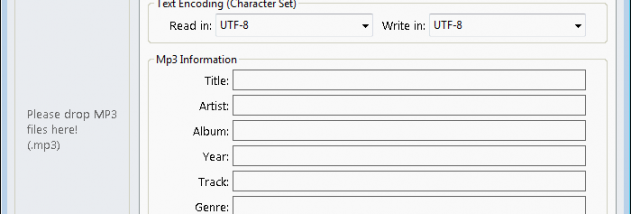

Moo0 Mp3InfoEditor is a Windows utility for editing information stored in MP3 files. It is intended for people who want to correct or organize music-file details without using a full audio-editing application. The program works with metadata rather than the sound itself, so it can be used to keep track information consistent while leaving the audio unchanged.
The editor supports multiple character sets, including UTF-8 and UTF-16. This helps preserve text from different languages when metadata is entered or updated, and can be useful when a tag appears incorrectly in another application because of character encoding. Users can edit information for individual MP3s or apply a shared value to multiple files, such as setting the same album title across a group of tracks.
Batch editing is suited to organizing collections after ripping or importing music. Instead of opening every track separately to enter a repeated detail, a group can be updated together. Individual edits are useful for correcting inconsistent entries, while the ability to handle several files at once reduces repetitive work on albums or other related sets. The program focuses on MP3 information editing; it is not an audio player or a tool for changing the music recording.
Typical uses include tidying tags in a personal music library, fixing text encoding issues, and applying common album information to multiple tracks. Moo0 Mp3InfoEditor is freeware and is designed for Windows. Its interface and scope are centered on editing MP3 file information, making it a straightforward option for users who need tag changes without a broader music-management workflow.