Moo0 RightClicker
Moo0 RightClicker adds extra commands to the Windows Explorer context ... rather than the full feature range of the Pro edition. Folder bookmarks make frequently used locations easier to ...

Moo0 RightClicker PRO adds file-management commands to Windows Explorer's right-click menus. It can duplicate the current Explorer window and open, copy or move items to bookmarked folders. A customizer lets users hide and reorder entries, group related commands in menu folders and change icons. Shift-right-click reveals all available menus, and hidden defaults can be restored.
| Author: | Moo0 |
| License: | Trialware |
| Price: | $26.00 |
| Released: | Jan 30, 2018 |
| File size: | 7.53 MB |
| Downloads: | 345 |
| Keywords: | customize context menus, file management enhancement, Windows 10 utility, context menu enhancement, context menu, right click, explorer right click menu, move files to bookmarked folder, enhancement, explorer context menu, user-friendly interface, software review, Moo0 RightClicker PRO, right click menu, duplicate explorer window, windows context menu enhancer, copy to bookmarked folder, context menu customization |
| Author URL: | https://www.moo0.com/ |
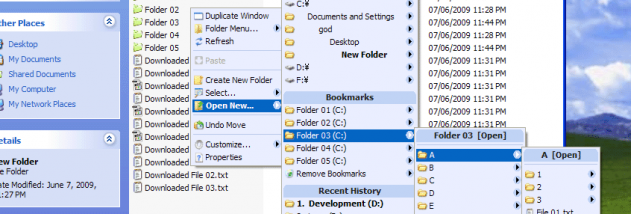



Moo0 RightClicker PRO extends the context menus used in Windows Explorer. It is intended for people who often manage files and folders and want common actions closer to hand when right-clicking. Rather than opening a separate file manager, it adds commands to Explorer's existing menus, including options for working with folders and managing Explorer windows. Its customizer lets users shape the menus around the actions they use most often.
The added commands cover several routine file-management tasks. A command can open a bookmarked folder, or copy or move selected items to one, reducing the need to browse through folder levels to reach a frequent destination. Another command duplicates the current Explorer window, which is useful when comparing locations or keeping a source folder open while working elsewhere. These actions are available from the right-click menus, where they can be used alongside Explorer's usual file and folder operations.
Menu organization is a central part of the program. The customizer can hide entries that are rarely used, rearrange the order of commands, and group related items in a newly created menu tree folder. Users can also change menu icons to make entries easier to distinguish. Default Windows context-menu items can be restored through the customizer's UnHide controls, so hiding an entry does not require leaving it unavailable permanently. Holding Shift while right-clicking displays all available menus, providing a way to reach entries that have been hidden from the regular menu.
These controls suit users who repeatedly copy or move files to a small set of destinations, switch between Explorer locations, or want to reduce clutter in a busy context menu. The initial menu may take some adjustment, particularly for people accustomed to Windows' standard right-click options. A practical setup is to begin with a few frequently used commands, then hide or regroup entries as their usefulness becomes clear. The ability to reveal all menus with Shift and restore hidden defaults gives users ways to find commands while refining the layout.
Moo0 RightClicker PRO is trialware and integrates with Windows Explorer rather than replacing it. The supplied operating-system information includes Windows 10, as well as earlier Windows releases; it does not establish support for Windows 11. Its main purpose is to customize Explorer's right-click workflow, so the benefits depend on how often users rely on context menus for file organization.