Moo0 RightClicker PRO
Moo0 RightClicker PRO extends the context menus used in Windows ... ways to find commands while refining the layout. Moo0 RightClicker PRO is trialware and integrates with Windows Explorer ...

Moo0 RightClicker extends the Windows Explorer context menu with shortcuts for common file-management tasks. It can duplicate the current Explorer window and open bookmarked folders, or copy and move items to them. Users can hide default menu entries and restore them through Customize and UnHide; holding Shift while right-clicking reveals available menus. It is freeware for Windows.
| Author: | Moo0 |
| License: | Freeware |
| Price: | FREE |
| Released: | Jan 30, 2018 |
| File size: | 7.53 MB |
| Downloads: | 260 |
| Keywords: | context menu customization, context menu enhancement, enhancement, right click menu, duplicate explorer window, move files to folders, x64 application, software review, bookmark folder context menu, windows context menu enhancer, explorer right click menu, copy files to folders, Windows 10 utility, explorer context menu, context menu, Moo0 RightClicker, Moo0 software developer, right click |
| Author URL: | https://www.moo0.com/ |
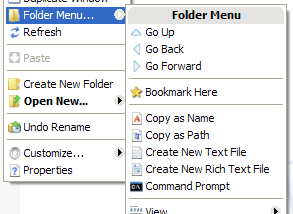



Moo0 RightClicker adds extra commands to the Windows Explorer context menu, the menu opened with a right-click. It is intended for people who often move between folders or perform file-management tasks and want shortcuts close to the files and folders they are working with. The freeware provides a set of selected enhancements rather than the full feature range of the Pro edition.
Folder bookmarks make frequently used locations easier to reach from the context menu. Commands can open a bookmarked folder, or copy or move selected items to one, reducing the need to navigate through several Explorer windows. The option to duplicate the current Explorer window is useful when a second view of the same location is needed for comparing contents or arranging files between folders.
RightClicker also lets users hide default context-menu entries to simplify the menu. Hidden entries can be restored through Customize and UnHide, so less-used commands do not have to be removed permanently. Holding Shift while right-clicking displays the available menus, providing a way to access commands that are otherwise out of view. These controls allow the menu to be adjusted as users settle into a preferred workflow.
The added commands are most useful for everyday file organization: opening common destinations, copying or moving items into bookmarked folders, and creating another window without manually reopening the current location. Because the software changes a familiar part of Explorer, its extra menu structure may take some time to learn. Exploring the available entries and adjusting which default commands are visible can help keep the menu practical.
Moo0 RightClicker is freeware for Windows Explorer. The stated system support includes Windows XP, Vista, 7, 8 and 10, including listed 64-bit editions of Vista, 7, 8 and 10. The program is a basic set of context-menu enhancements; users seeking a broader collection of functions can consider Moo0 RightClicker Pro.