X-Mouse Button Control
X-Mouse Button Control (XMBC) is a free Windows utility for remapping mouse buttons and the scroll wheel. It is useful for people who want different mouse actions in different programs, or who need extra ...

Mouse Button Control changes mouse-button behavior and can turn a middle-button click into a rapid left-button double-click. It can also reassign mouse buttons and make the keyboard arrow keys move the cursor one pixel per press. The arrow-key mode can be toggled as needed, making it useful for precise selection and positioning while dragging objects.
| Author: | ElectraSoft |
| License: | Shareware |
| Price: | $29.99 |
| Released: | Mar 25, 2023 |
| File size: | 1.17 MB |
| Downloads: | 295 |
| Keywords: | Tweak Mouse, Tweaker, mouse button control, Mouse, Windows 10 compatible, customizable mouse settings, Tweak, x64 software, middle click double click, user-friendly interface, pixel cursor movement, ElectraSoft, mouse button remapper, Mouse Button Control, arrow keys move cursor, mouse button customization, Button Control |
| Author URL: | https://www.electrasoft.com/ |
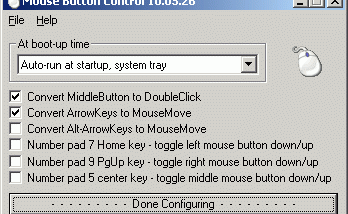

Mouse Button Control is a Windows utility for changing how mouse buttons and keyboard arrow keys behave. It is suited to people who want a middle-button click to trigger a rapid left-button double-click, or who need finer cursor positioning while working with objects on screen. Its controls let users adjust mouse input without changing the way applications themselves handle their usual functions.
The program can convert a click of the center, or middle, mouse button into a double-click of the left button. This is useful for actions that normally require two quick left-clicks, such as opening an item or selecting a control, while keeping the left button available for ordinary use. The center button can also be configured for a different action, and the utility can redefine other mouse buttons to perform alternate functions.
An optional keyboard mode makes the four arrow keys move the mouse pointer by one pixel per press. Because the setting can be switched on and off as needed, the keys can be used for precise adjustments without permanently replacing their normal keyboard behavior. For example, a user can hold the left mouse button to select or drag an object, then tap an arrow key to nudge the pointer and refine its position. Single-pixel movement is especially useful when a standard mouse movement is too coarse for the task.
These controls can help with repetitive clicking, precise selection, and positioning objects or interface elements. The middle-button conversion offers an alternative way to initiate a double-click, while button reassignment allows the available mouse controls to better fit a particular workflow. The arrow-key option complements the mouse rather than replacing it, providing a small-step adjustment method when accuracy matters.
Mouse Button Control is shareware and is intended for Windows. Its listed operating-system support includes Windows XP, Vista, 7, 8, and 10, including some 64-bit editions; Windows 11 support is not established here. The program focuses on input remapping rather than broader mouse management, so its usefulness centers on the specific button and cursor behaviors it provides.