MP3 Key Changer Version
MP3 Key Changer is an audio utility for singers, ... song's pitch or playback speed. It works with MP3 and WAV files, making it useful for preparing ...

Mp3 Tag Tools is an open-source editor and organizer for MP3 collections. It supports ID3v1.1 and ID3v2.x, batch tagging, lyrics and picture tags, and copying or synchronizing tag data. Custom formats can write tags from filenames, rename files from metadata, or create folders. It also cleans filenames and exports tag data as tab-delimited text.
| Author: | John George K. |
| License: | Open Source |
| Price: | FREE |
| Released: | Jun 30, 2015 |
| File size: | 328 kB |
| Downloads: | 372 |
| Keywords: | tag writer, mp3 tag editor, mp3 file organizer, audio file organizer, id3 tag editor, batch mp3 tagging, tag, ID3 tag editor, mp3 organizer, editor, edit mp3 lyrics artwork, cover art management, batch tag processing, tag editor, mp3 metadata editor, Windows 10 compatible, mp3, Mp3 metadata editing |
| Author URL: | http://massid3lib.sourceforge.net/ |


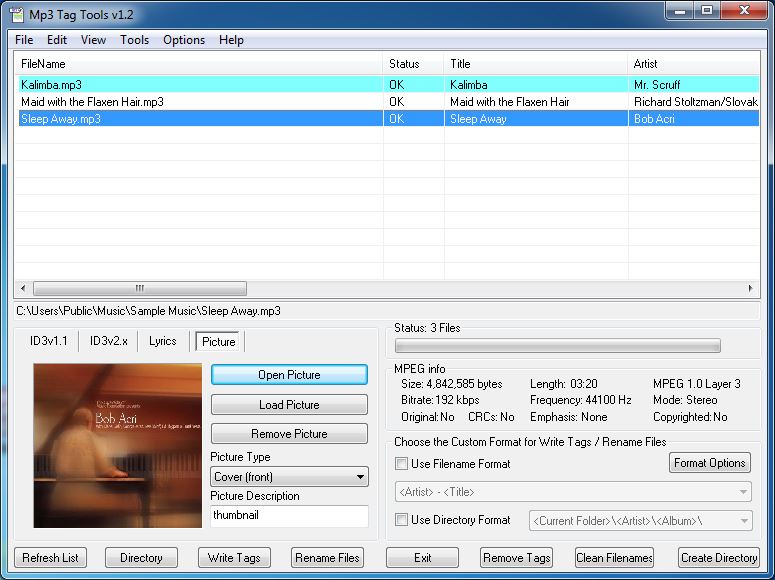

Mp3 Tag Tools is an open-source utility for editing ID3 metadata and organizing MP3 collections. It is suited to listeners who want to maintain consistent track details, add lyrics or artwork, and arrange files using information stored in their tags. The program works with ID3v1.1 and ID3v2.x, and can edit tracks individually or in batches.
Tag fields can be written from filenames by defining a custom filename format and matching its parts to tag information. The reverse is also possible: filenames can be renamed from ID3 tags, with custom filename or directory formats controlling how the results are structured. Directory formats can also be used to create tags or build folders from existing tag data. These options help bring tracks from different sources into a consistent naming and folder system.
For collection maintenance, the program can selectively copy or synchronize ID3v1.1 and ID3v2.x data, remove either type of tag, or clear non-ID3 tags. Filename cleanup tools handle unwanted characters such as underscores, excess spaces, and inconsistent capitalization. Mp3 Tag Tools can also read MPEG information and add details such as bitrate and mode to filenames. Tag editing is available while MP3 files are playing.
Files can be selected from a list populated by searching a chosen directory, with recursive search available for nested folders. This makes it possible to apply operations to selected tracks or process groups throughout a music library. Tag data can be sorted and exported as tab-delimited text for use in spreadsheet programs, while the search list can also serve as a basic MP3 finder and virtual playlist.
The utility handles MP3 files and is distributed as open-source software. Its compact download is intended for Windows, including Windows 10; the provided compatibility information also covers earlier Windows releases. It is useful for users who need focused metadata editing and file organization rather than a full music playback library manager. Because batch renaming and folder creation can alter a collection's layout, reviewing format rules and selections before applying changes helps keep the library organized as intended.