Notepad!
Notepad! is a freeware text editor for Windows users who want more than the basic Notepad application. It supports everyday text work as well ...

Notepad++ is a free, open-source text and source code editor for Windows. Its tabbed interface makes it easy to work with several documents, while syntax highlighting and code folding help organize source in languages such as C++, Java, HTML, XML and Python. Search and replace supports regular expressions, and macros can automate repeated editing steps. Split views, multi-editing and a plugin ecosystem add flexibility for coding and everyday text work.
| Author: | Don HO |
| License: | Open Source |
| Price: | FREE |
| Released: | Jun 1, 2026 |
| File size: | 6.50 MB |
| Downloads: | 691 |
| Keywords: | search, project, syntax highlighting editor, editor, recording, languages, notepad replacement, status, Notepad alternative, text editor, Notepad++ review, notepad++ editor, advanced code editing, x64 text editor, user, notepad, win64, highlighting, detection, code editor with tabs, drop, win32, code, Windows 10 application, Notepad ++, Don HO software, open-source software, source code editor, regular expression text editor |
| Author URL: | https://notepad-plus-plus.org/ |

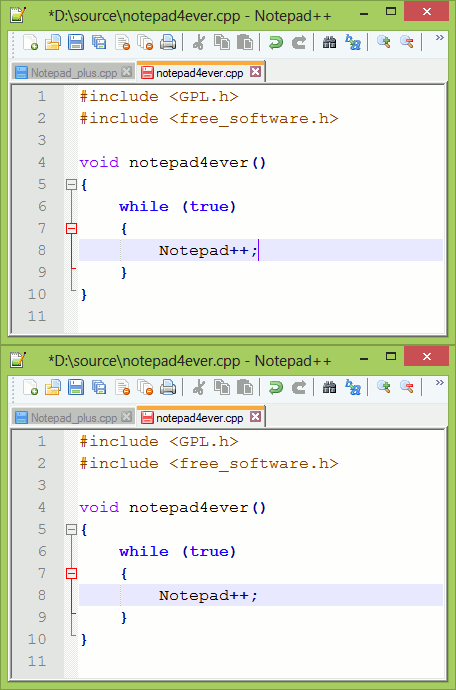




Notepad++ is a free, open-source text and source code editor for Windows, suited to programmers, web developers and anyone who regularly works with plain-text files. Its tabbed interface keeps several documents open in one window, making it straightforward to switch between source files, notes and configuration files without juggling separate editor windows. It also serves as a more capable alternative to the basic text editor included with Windows, while remaining focused on editing rather than a full development environment.
For code work, the editor provides syntax highlighting for languages including C++, Java, HTML, XML and Python. Color-coded syntax helps distinguish language elements while reading or modifying a file, and code folding can collapse sections that are not currently relevant. Auto-completion can suggest code elements as users type, helping speed up common edits. A split-view layout places documents side by side, while multi-editing allows changes to be made in more than one location at a time. These tools are useful when comparing related files or making repeated adjustments across a document.
Search and replace includes regular-expression support for more flexible text matching, and can be used to locate or change patterns across multiple files. Macro recording captures a sequence of editing actions for later playback, which can reduce repetitive work. The interface includes a customizable toolbar, and plugins can add capabilities beyond the editor's built-in tools. Available extensions cover tasks such as spell checking and FTP-related workflows, so users can select additions that fit their needs rather than relying on features they do not use.
Notepad++ works for quick everyday tasks such as editing notes, cleaning up text, viewing source files and changing configuration settings, as well as for writing and maintaining code. Its combination of tabs, language-aware display, search tools and macros supports both occasional edits and longer coding sessions. The editor is designed to stay lightweight, and it can handle large files as well as smaller documents, making it practical when a full integrated development environment would be unnecessary.
Notepad++ is open-source software developed by Don HO and is available at no cost. It supports Windows 10 and Windows 11, along with older Windows releases. The interface and feature set can be extended with plugins, while the core application remains useful for plain-text editing without additional setup. Users looking for a focused Windows editor for source code and general text can use it for both, choosing syntax-aware tools when needed and a simple document view for ordinary text.