Simple Tab Groups
... revolutionizes your browsing experience by allowing you to organize your tabs into customizable groups, making it easier ... to chaotic browsing and hello to a more organized and efficient way to navigate the web. Download ...

Papercuts is a Chrome extension for keeping multiline notes and memos in the browser. Labels and a tabbed interface help organize reminders, reusable text and reference details. Users can add selected web text to a note, paste notes into form fields from the context menu or keyboard shortcuts, and sync notes between computers through Chrome. Notes can also be edited, reordered, hidden or deleted.
| Author: | Mark P. Lunney |
| License: | Freeware |
| Price: | FREE |
| Released: | Jan 25, 2023 |
| File size: | 123 kB |
| Downloads: | 275 |
| Keywords: | multiline memo tool, chrome note organizer, quick note extension, Note, Sticky, browser sticky notes, Windows 10 application, Mark P. Lunney, x64 compatible, Sticky Note, innovative note-taking tool, Note Organizer, paste notes into forms, Chromeshark developer, Papercuts software, Quick Note, sync notes between computers, Organize |
| Author URL: | http://www.marklunney.com/ |
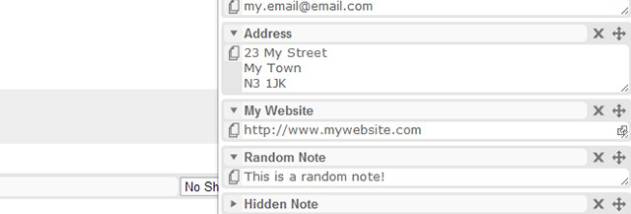

Papercuts is a note-keeping extension for Chrome that stores notes and memos in the browser. It suits people who want quick access to reminders, reusable text and short reference notes while browsing, without keeping separate paper notes or opening a dedicated editor. Notes can be organized in one place and carried between computers through Chrome sync.
The extension supports unlimited multiline notes, with labels to distinguish topics or purposes. Its tabbed interface separates notes across multiple pages, making it easier to keep reminders apart from form responses, snippets or other reference material. Notes can be edited, reordered and deleted as they change, while hiding or disabling notes can reduce clutter when they are not needed.
Papercuts also provides ways to move text between web pages and notes. Selected text can be added to a note from the browser context menu, which is useful for saving details encountered while browsing. Notes can be pasted into form fields through the context menu or keyboard shortcuts, helping with repeated entries and commonly used text. This keeps the note-taking workflow close to the page where the information is needed.
The extension is useful for storing temporary reminders, collecting text for later reference, and keeping reusable details available during online tasks. Chrome sync lets notes be shared between computers signed in to the same Chrome account, so the same material can be available across those devices. The ability to adjust the extension's width and choose a background color provides basic control over how its note area appears.
Papercuts is freeware and is intended to run as a Chrome extension on Windows. Its core workflow depends on Chrome, including Chrome sync for transferring notes between computers. The extension offers a focused set of note-organizing and copy-and-paste tools rather than a full document editor, making it suited to brief, browser-accessible information.