PassFab for PPT for Windows 10 - Full description
PassFab for PPT is a password recovery utility for Microsoft PowerPoint files. It is intended for people who have forgotten or lost the password needed to open a presentation, including students, educators and professionals who need to regain access to their own files. Rather than editing slides or creating presentations, the program attempts to recover a password so the protected file can be opened again.
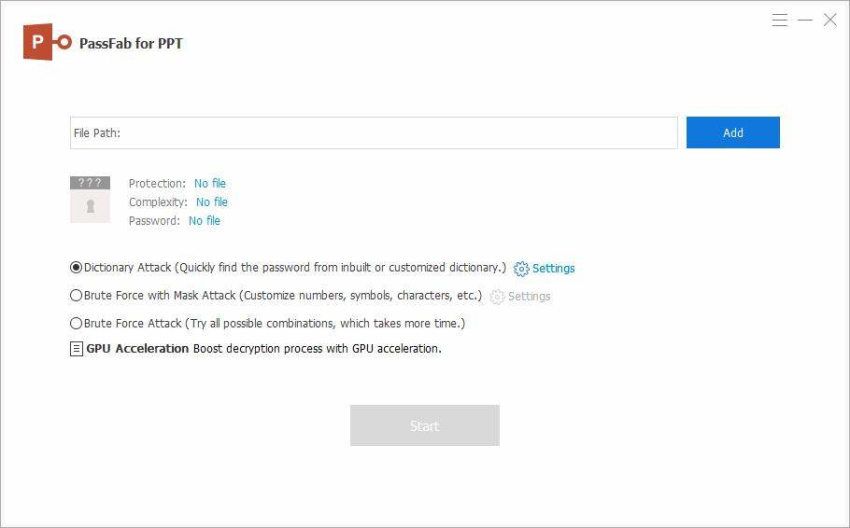
The recovery process offers three attack modes for different levels of information about the missing password. Dictionary Attack checks words from a predefined or custom dictionary, making it a practical starting point when the password may be a familiar word or phrase. Brute-force with Mask Attack lets users enter known details, such as the password's length or character set. Restricting the search with those clues can reduce the number of possible combinations that need to be tested.
Brute-force Attack checks possible character combinations without relying on a dictionary or known password pattern. It can be used when little is known about the password, although the time required depends on the number of combinations to search. The three approaches let users choose a method suited to what they remember, from likely words to a broader search. PassFab for PPT also uses multi-core CPU processing and GPU acceleration to speed up recovery work on supported hardware.
The interface guides users through selecting a presentation and choosing a recovery method, so the process does not require specialist technical knowledge. These options can be useful when an important presentation is inaccessible because its password has been misplaced, whether the file is needed for study, teaching or work. The program is focused on password recovery rather than general file repair or presentation editing.
PassFab for PPT is offered as demo software and supports Windows 10 and Windows 11, as well as Windows 7 and Windows 8 in 32-bit and 64-bit editions. Recovery time varies according to the password and selected search method. The program is intended for files the user is authorized to access; recovering a password does not replace the need to keep backups of important presentations.