Quick Budget
... a printable budget are useful. A user can create a plan for a chosen period, include income that arrives on a repeating schedule, and review ...

PerfectTablePlan helps event organizers plan guest seating for weddings, corporate events, galas and other gatherings. Import guest lists from Excel or CSV, group guests using custom attributes, and arrange them around tables with drag and drop. Customize table shapes and sizes, review possible seating conflicts, then create reports, print charts or share an interactive plan online.
| Author: | Oryx Digital Ltd |
| License: | Demo |
| Price: | $29.95 |
| Released: | Oct 23, 2026 |
| File size: | 72.30 MB |
| Downloads: | 407 |
| Keywords: | table seat, wedding seating chart, create, seating arrangement tool, x64 compatibility, seating chart maker, event planning software, event table planner, Oryx Digital Ltd, table plan, guest seating arrangement, event seating planner, seat, PerfectTablePlan, table plan software, seat planner, table, Windows 10 application |
| Author URL: | https://www.perfecttableplan.com/ |



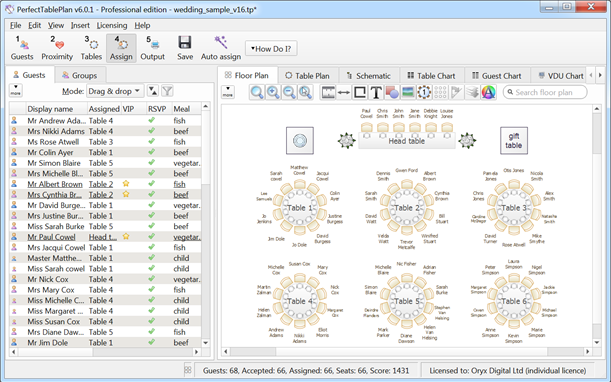


PerfectTablePlan is a Windows seating-plan tool for event organizers who need to arrange guests around tables and communicate the layout to staff or attendees. It can be used for weddings, corporate events, galas and other gatherings where guest groups, venue space and table assignments need to be coordinated. A visual workspace makes it possible to build a plan and adjust it as the guest list or event requirements change.
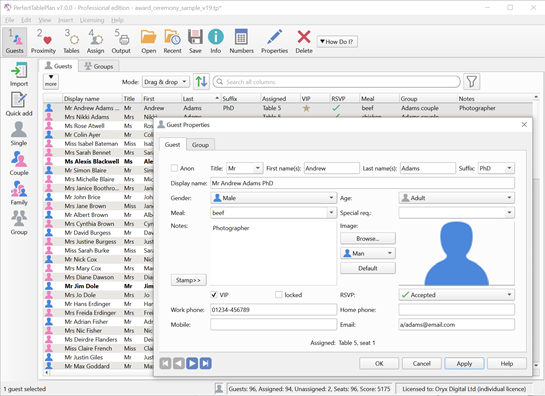
Guest information can be imported from Excel and CSV files, reducing the need to enter an existing list again by hand. Guest records can be organized with custom attributes such as dietary preferences, VIP status or group affiliations. These details help planners identify people with particular needs or relationships while assigning seats, and make it easier to review the list alongside the layout.
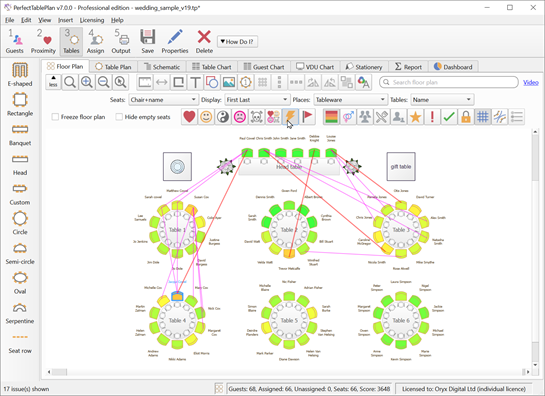
The plan can include tables in different shapes and sizes, with custom table designs available for venues that do not fit standard arrangements. Guests and tables can be repositioned using drag and drop, while visual feedback shows how the assignments are arranged. This supports practical checks such as whether the layout fits venue constraints and whether the available space is being used effectively. The software can also flag potential seating conflicts, including incompatible guests seated together, and suggest ways to address them.
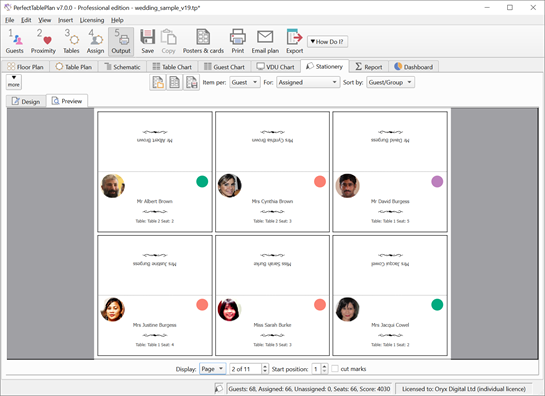
After the seating plan is prepared, PerfectTablePlan can produce reports and printable seating charts, or share an interactive plan online. These options support different stages of event preparation: organizers can review assignments internally, provide printed information at the venue or make the plan available to other stakeholders. Multi-language functionality can also help with events involving participants or organizers who use different languages.
PerfectTablePlan is intended for both occasional planners and people who regularly organize events, with a drag-and-drop approach for everyday changes and guest-list tools for more detailed planning. The software is offered as a demo and is designed for 64-bit Windows 10 and Windows 11. Its focus is event seating rather than general-purpose spreadsheets or venue design, so it is suited to turning a guest list and table arrangement into a coordinated seating plan.