Magic Calendar Maker
Welcome to the home of Magic Calendar Maker, an innovative software developed by Magic Project, designed for Windows 10 users who crave simplicity and efficiency. This software ...

Pimlical combines appointments, tasks, memos and contacts in a customizable calendar for users with complex schedules. It syncs directly with Google Calendar and adds searchable, filterable views, custom colors and fonts, event time zones, reminders, and priority settings. Batch editing, snooze controls and multi-level undelete help manage calendar changes.
| Author: | Pimlico Software, Inc. |
| License: | Trialware |
| Price: | $7.95 |
| Released: | May 3, 2026 |
| File size: | 52.80 MB |
| Downloads: | 385 |
| Keywords: | calendar management, calendar task manager, contact, Windows 10, manage, calendar organizer, Pimlico Software, calendar, manager, Pimlical, sync, PIM, task calendar, event reminders, appointment scheduler, x64, productivity software, google calendar sync |
| Author URL: | https://www.pimlicosoftware.com/PimlicalDesktopFeatures.html |
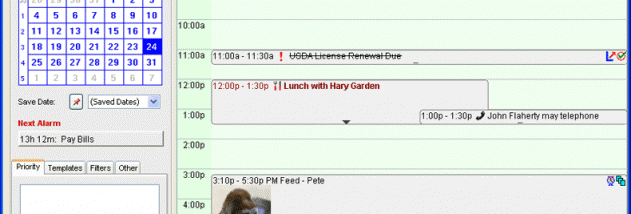

Pimlical is a calendar and personal information manager for people who need to coordinate appointments, tasks, memos and contacts in one place. It connects directly with Google Calendar while adding detailed ways to view, organize and adjust schedule information. Its extensive controls and customization options suit busy users managing complex calendars better than those looking for a basic appointment grid.
The calendar can display Google Calendar entries with custom colors, fonts and icons, and users can search or filter calendars to focus on relevant events. Events can carry individual time zones, including separate zones for their start and end times, which helps when arranging travel or meetings across regions. Floating events, priority and urgency settings, and automatic reminders provide additional ways to distinguish important items and keep them visible. Tasks can also be assigned priorities and urgency, bringing action items alongside scheduled commitments.
Pimlical includes tools for changing schedules in batches rather than editing each entry separately. For example, one command can move all events in a day's schedule forward by an hour. Snooze and alarm controls help manage reminders, while multi-level undelete offers a way to recover removed information. The application has hundreds of preference settings, allowing users to tailor its views and behavior to their working habits. Those who have used Pimlico's DateBk6 on Palm handhelds can migrate their older data to newer platforms and carry familiar calendar features into Pimlical.
The program is intended for executives and other power users who handle dense schedules, recurring tasks and detailed event information. It can be used to maintain a single view of appointments and reminders, coordinate work across time zones, and search large Google Calendar collections without relying only on the standard calendar display. Its depth may be more than necessary for someone who wants only a simple calendar.
Pimlical is trialware for Windows, with support for Windows 10 and Windows 11 as well as earlier Windows releases. It synchronizes directly with Google Calendar, so users can work with their calendar data through Pimlical's expanded filtering and display options. The program also provides a migration path for DateBk6 users moving from Palm devices.