
Playlist Extractor

Playlist Extractor 0.07

Copy songs from playlists to another location

Playlist Extractor copies music files referenced in M3U, M3U8 and WPL playlists to a chosen destination, such as an MP3 player or backup folder. Load multiple playlists, review their tracks and deselect songs that should be left out. The freeware utility is designed for playlist-based transfers rather than playback or playlist editing.

Playlist Extractor 0.07 details

Author:
License: Freeware
Price: FREE
Released:
File size: 102 kB
Downloads: 376
Keywords: playlist backup tool, extractor, extract playlist, transfer playlist songs, Windows 10, playlist, music playlist management, create backup, playlist file extractor, copy songs from playlist, x64 software, m3u playlist copier, SourceForge, Playlist Extractor, extract, backup playlist, Joeri Colman, wpl playlist copier
Author URL: http://sourceforge.net/projects/playlistextract/
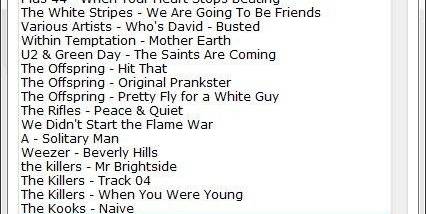
Playlist Extractor screenshot
Playlist ExtractorOtherWindows XP, Windows Vista, Windows Vista x64, Windows 7, Windows 7 x64, Windows 8, Windows 8 x64, Windows 10, Windows 10 x64

User Rating: 0 (0 votes)

Windows 10

x32

Windows 10

x64

Playlist Extractor Awards

Windows 10 download editor's pick

Playlist Extractor for Windows 10 - Full description

Playlist Extractor is a small Windows utility for copying music files referenced in playlists to another location. It is intended for listeners who want to gather selected tracks from existing playlists for a portable music player or make a separate backup without copying each song manually.

The program reads M3U, M3U8 and WPL playlist files. Load one or more playlists, review the tracks they contain and choose which files to copy. This makes it possible to collect music from several playlists in a single task, while deselecting tracks that are not needed for the destination.

The selected songs are copied to a preferred location, such as an MP3 player or a backup folder. The playlist serves as the source for identifying the files; Playlist Extractor is for copying those files, rather than editing or playing the playlist. Its focused workflow is useful when a collection is already organized into playlists and only some of its tracks need to be transferred.

Typical uses include preparing a portable selection from favorite playlists, consolidating tracks from multiple lists and creating a backup of playlist contents in another location. The ability to exclude individual entries is helpful when a playlist contains songs that should remain on the computer or are not wanted in the copy.

Playlist Extractor is freeware and supports Windows versions through Windows 10, including 64-bit editions where indicated. The application works with M3U, M3U8 and WPL files; the music files referenced by a playlist need to be accessible for copying. Its compact, single-purpose design is suited to straightforward playlist-based transfers.

Playlist Extractor for Windows 10 - Post your review