POP Peeper Pro
Welcome to the download page for POP Peeper Pro, an exceptional Windows 10 software developed by ... experience. With its sleek interface and powerful functionality, POP Peeper Pro ensures you never miss an important ...

POP Peeper is a desktop email notifier for monitoring several mail accounts without opening each one separately. It supports POP3 and IMAP, including instant notifications through IMAP IDLE, and uses SMTP to send mail. Users can set polling intervals for individual accounts and choose alerts such as sounds, a skinnable pop-up, voice notifications or a tray icon showing the number of new messages. Messages can be read, replied to, printed or deleted, with HTML, rich-text and plain-text viewing options.
| Author: | Esumsoft |
| License: | Freeware |
| Price: | FREE |
| Released: | Jun 13, 2023 |
| File size: | 2.98 MB |
| Downloads: | 489 |
| Keywords: | gmail, oauth2, notification, x64 architecture, Esumsoft, email notifier, user-friendly interface, multiple email accounts, hotmail, POP Peeper, webmail, webmail notifier, notifier, smtp, desktop email notification, email, aol, imap, pop3 email checker, pop3, imap mail alerts, aim, email notification software, yahoo, Windows 10 compatible |
| Author URL: | https://www.esumsoft.com |
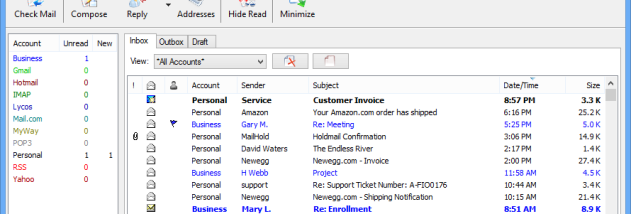

POP Peeper is a desktop email notifier for people who use several mail accounts and want to check for new messages without opening each mailbox in a separate browser or mail application. It connects to supported POP3 and IMAP accounts, including IMAP servers that use the IDLE command for immediate arrival alerts, and can send mail through SMTP. Separate polling intervals let each account be checked on its own schedule, which is useful when different providers or mailboxes need different update frequencies.
When new mail arrives, POP Peeper can signal it in several ways. The tray icon can change, animate or show the number of unread messages; sound alerts can be set per account, and a pop-up notifier can use different skins. Other alert choices include a flashing keyboard LED, voice notification and a customized screensaver. These options let users distinguish incoming mail by account or choose a quieter method when sound and visual interruptions are undesirable.
Messages can be viewed in HTML or in rich or plain text. For safer HTML viewing, the program offers options to remove potentially harmful attachments and web beacons. Users can also open attachments, reply to messages, print them or delete them, so routine mail handling does not always require switching to another application. SSL/TLS and OAuth2 support provide secure connection and authentication options where the mail service supports them, while password protection can help restrict access to the program.
Additional tools include an address book and portable operation. Advanced users can adjust toolbars, keyboard shortcuts, columns and fonts, while the interface also supports straightforward checking and reading for everyday use. POP Peeper is suited to monitoring personal or work inboxes, keeping an eye on webmail accounts and consolidating new-mail alerts from multiple providers. It is freeware and supports a broad range of languages. The supplied system requirements specify no minimum requirements; supported operating-system details should be checked against the download's compatibility information before installation.