PortableApps Suite for Windows 10 - Full description
PortableApps Suite is a launcher and management platform for portable applications. It helps people keep a collection of programs and their settings together in one location, then use that collection on different Windows PCs. The platform can be installed on a USB drive, an internal or external drive, or a supported synced cloud folder, making it useful for people who move between home, work, school, and shared computers. Applications and personal data remain organized in the chosen location rather than being scattered across each computer.
A built-in app store provides a way to browse and install available applications. Users can explore by category, title, newest releases, or recent updates, then select the programs they want for their own collection. The catalog spans areas such as browsers, office software, utilities, games, education, image editing, and chat. This lets each person assemble a practical set of tools instead of installing a fixed bundle, and the platform can manage a small selection or a larger library.
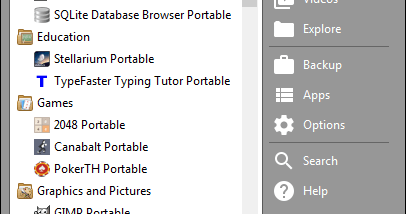
The customizable menu helps keep installed apps accessible. Programs can be grouped into folders, marked as favorites, or arranged around individual preferences. An option can bring frequently used apps forward, while integrated search locates a program by name; keyboard navigation and launching from search support quick access without browsing through the full collection. These features are particularly useful when the suite contains many applications or is used on a small portable drive.
The platform also includes an updater that checks for available application updates and offers to download and install them. Updates are designed to preserve settings and saved files, and they can be postponed when time or internet access is limited. Keeping the apps in one location also makes the collection easier to back up or store in a synced folder. A portable drive can carry the same working environment between PCs, while a local installation can serve personal or shared use.
PortableApps Suite is open source and free to use. Its installer supports setup on a cloud-synced folder, local storage, or portable media; actual app availability and behavior depend on the individual application. The platform is intended for Windows systems, including Windows 10 and Windows 11, as well as earlier Windows releases. It is suited to users who want a customizable, centrally managed set of portable tools rather than a single-purpose application.