Font Runner x64
... 10 users seeking a game-changing software experience. Discover Font Runner x64, a remarkable creation by the talented ... tool revolutionizes the way you manage and explore fonts on your Windows 10 device. With its sleek ...

NexusFont is a font viewer and manager for designers who need to browse and organize typefaces. It can display several fonts at once using a sentence chosen by the user, making side-by-side comparison more relevant to real design work. The program also helps manage a font collection, while its portable edition can be used without a conventional installation.
| Author: | Xiles |
| License: | Freeware |
| Price: | FREE |
| Released: | Nov 25, 2022 |
| File size: | 5.30 MB |
| Downloads: | 390 |
| Keywords: | Windows 10 compatible, x64 architecture, Portable NexusFont, software review, font browser, compare fonts, font, font management, font viewer, font preview tool, Xiles, font explorer, explorer, font manager, portable font manager, viewer |
| Author URL: | https://www.xiles.app/ |
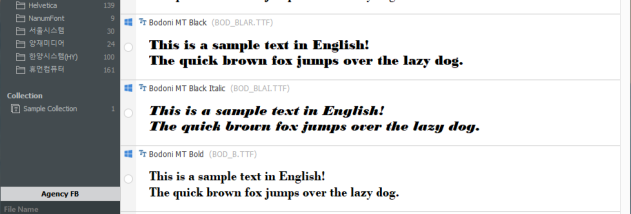

NexusFont is a font viewer and manager for people who work with type, including web designers and other design professionals. Its central purpose is to make font collections easier to inspect and organize: instead of opening files one at a time, users can browse typefaces in a single interface and compare how different fonts look. The portable edition is intended to be used without a conventional installation, which can be useful when working across different computers or keeping font tools separate from the Windows setup.
The preview feature displays multiple fonts at once using a sentence chosen by the user. This makes it easier to compare letterforms, spacing and overall appearance with text relevant to a design, rather than relying only on alphabet samples. Users can change the preview wording to check a particular name, heading or phrase, then scan a group of typefaces to find a suitable match. This approach is useful when selecting fonts for layouts, websites, documents or visual identities.
NexusFont also helps users manage fonts as a collection. Fonts can be browsed and organized within the program, making it easier to locate a typeface without manually opening each font file. Font management tools can support tasks such as adding fonts for use in Windows and removing fonts that are no longer needed. Keeping a collection accessible in one place is particularly helpful for designers who handle many typefaces and want to review them before using them in a project.
The program suits both occasional font selection and ongoing font-library maintenance. A designer can use it to compare several options while preparing a web page, check how a typeface handles a particular line of copy, or sort through a larger collection before choosing fonts for a project. Its focus is on practical viewing and organization rather than creating or editing font files.
NexusFont is freeware from Xiles. The portable edition is for Windows, with the supplied compatibility information covering Windows XP through Windows 11. As with other font managers, fonts must be available to the program to preview them, and installing fonts may affect which typefaces are available to other Windows applications. The portable format can be useful for keeping the manager and its working environment together, while the preview and organization tools help make a large font collection easier to handle.