DSLR Remote Pro
... a Windows application for tethered control of compatible Canon EOS digital SLR cameras. It is designed for photographers who want to operate a camera from a computer, inspect captures on a larger ...

PSRemote controls compatible Canon PowerShot cameras from a Windows PC over a USB connection. Its live viewfinder lets photographers compose and operate the camera remotely, while large previews, exposure alerts and a grid overlay help review and align shots. It also supports time-lapse sequences and photo-booth-style capture with automatic printing.
| Author: | Breeze Systems Ltd. |
| License: | Demo |
| Price: | $175.00 |
| Released: | Jun 27, 2017 |
| File size: | 18.80 MB |
| Downloads: | 306 |
| Keywords: | camera live view software, Windows 10 compatible, camera, remote camera control, usb, powershot tethered shooting, usb connection, canon camera remote control, PSRemote, x64 software, camera time lapse software, Canon PowerShot, control camera, canon, photo booth camera software, usb camera control, Breeze Systems Ltd, professional photography software |
| Author URL: | https://www.breezesys.com/ |
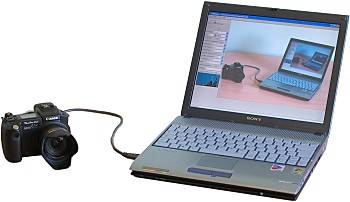

PSRemote is a Windows tethered-camera utility for controlling Canon PowerShot models that support remote capture. It is intended for photographers who want to operate a compatible camera from a computer rather than handle it directly, including when the camera is mounted in a fixed, distant or difficult-to-reach position. A standard USB cable connects the camera to the PC, with operation supported at distances of up to about five metres.
The software provides camera controls from the computer and displays a live viewfinder image on screen. This lets users compose and adjust shots while watching the scene remotely, which is useful for product photography, wildlife observation and other setups where touching the camera could disturb the framing. After capture, large, high-resolution previews appear on the PC within seconds, making it easier to inspect results before continuing a session.
PSRemote also offers tools for evaluating and composing images. Flashing highlights identify areas that are overexposed, while a grid overlay helps with alignment. Computer-based control of camera settings can help photographers manage exposure in difficult lighting and make repeatable adjustments during a tethered shoot. The preview and remote controls keep the camera and workstation in one workflow, reducing the need to move between the camera and computer.
For automated capture, the program can create time-lapse sequences over short or extended periods, and it supports photo-booth-style sessions that take a sequence of pictures and print them automatically. Motion-triggered photography for wildlife or security use is available through Webcam Zone Trigger, which is a separate purchase and is required for that function. These options make PSRemote useful for event setups, product listings, observation projects and unattended camera work, provided the PowerShot model supports remote capture.
PSRemote is commercial software offered as a demo. It is intended for Windows PCs; the stated operating-system support includes Windows Vista, Windows 7, Windows 8 and Windows 10, including their 64-bit editions. Camera compatibility depends on the specific Canon PowerShot model and its remote-capture support, so users should check their camera before relying on tethered controls or automated shooting.