Rainlendar Lite
Rainlendar Lite is a compact desktop calendar for people who want to keep appointments and to-do items visible on their Windows desktop. Its calendar and event views provide a quick way to ...

Rainlendar Pro is a desktop calendar and task organizer that keeps appointments, deadlines and to-do items visible on the Windows desktop. It displays multiple calendars together and supports iCalendar and synchronization with online services such as Google Calendar. Events can recur, use alarms and reminders, and be edited with drag and drop. Its to-do list includes priorities, categories and due dates, while skins, widgets and transparency settings let users adjust the appearance.
| Author: | Rainy |
| License: | Demo |
| Price: | $9.95 |
| Released: | May 15, 2026 |
| File size: | 43.10 MB |
| Downloads: | 321 |
| Keywords: | appointment scheduler, Windows 10, Rainy, manager, to-do list organizer, customizable calendar, calendar event reminders, calendar application, calendar, display month, reminder, Outlook calendar, google calendar sync, x64 software, desktop calendar app, task management, Rainlendar Pro |
| Author URL: | https://www.rainlendar.net/ |


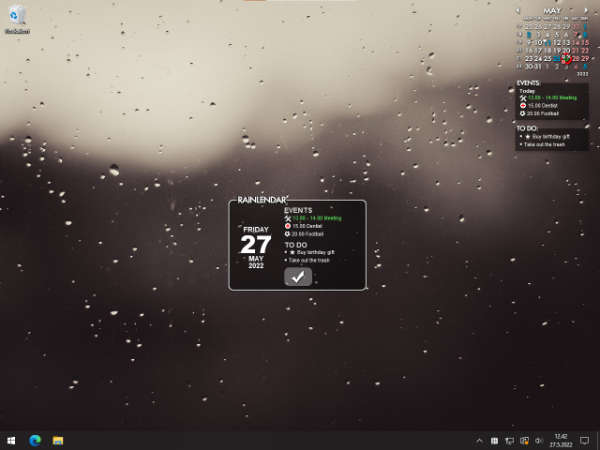



Rainlendar Pro is a desktop calendar and task organizer for people who want appointments, deadlines and to-do items visible alongside their everyday computer work. Its calendar can sit on the desktop, where users can check upcoming dates without opening a separate scheduling service. Multiple calendars can be shown at once, making it easier to keep personal, work and project schedules distinct while viewing them together.
The program supports iCalendar and can connect with online calendars such as Google Calendar, allowing events to be synchronized across services and devices. Users can add events, move or edit them with drag and drop, and set recurring entries for commitments that repeat. Alarms and reminders bring attention to upcoming appointments and deadlines, helping keep scheduled tasks from being overlooked. Calendar entries can be arranged across separate calendars to make busy schedules easier to review.
For task management, Rainlendar Pro provides a to-do list with priorities, categories and due dates. These options help users distinguish urgent work from routine tasks and group responsibilities by project or area of life. The calendar and task list put dated commitments and open tasks in one desktop workspace. Custom scripts can automate selected actions, while the interface's transparency settings let calendar elements remain visible without fully obscuring the desktop beneath them.
The appearance is adjustable through skins and widgets, so users can change how the calendar and related elements look on screen. This is useful for matching a preferred desktop style or making dates and tasks easier to scan. Multilingual support accommodates users working in different languages. The combination of multiple calendars, recurring events, reminders and categorized tasks suits personal planning as well as users coordinating work or project schedules.
Rainlendar Pro is offered as demo software and is available for Windows 10 and Windows 11, including 32-bit and 64-bit editions. It also supports Windows 8, Windows 7 and Windows Vista in both 32-bit and 64-bit editions. The desktop-based layout is intended for users who prefer a persistent calendar view rather than relying only on a browser or a full-screen organizer. Online-calendar synchronization requires the relevant calendar service; the program also supports local calendar and task organization.