Batch Files Free
... renowned BinaryMark. This software is a game-changer for Windows 10 users, offering a unique blend of functionality and ... is a versatile tool that allows users to automate and simplify repetitive tasks. It's a boon for ...

RoboTask automates recurring Windows work through a visual editor that combines actions without requiring batch files or scripting. It can launch applications, manage files, create backups, exchange files with FTP and web servers, and send email. Conditions, loops and custom variables support more complex workflows, while folder-change and connection events can trigger tasks. It can also run as an NT service when no user is logged on.
| Author: | NeoWise Software |
| License: | Shareware |
| Price: | $149.00 |
| Released: | Oct 18, 2026 |
| File size: | 187.26 MB |
| Downloads: | 569 |
| Keywords: | RoboTask, Windows 10, ftp upload automation, batch, software review, NeoWise Software, routine, automate, backup, scripting, repetitive, task, email task automation, macro, automation, x64 application, automated file backup, windows task automation, scheduled file management, task automation, tasks, schedule, visual workflow automation |
| Author URL: | http://www.robotask.com |
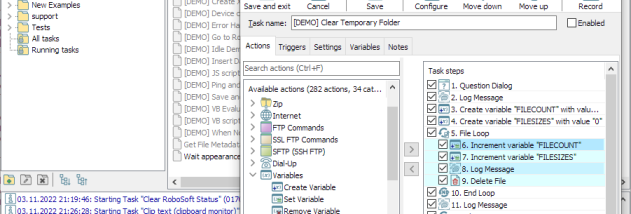


RoboTask is a Windows automation utility for people who want routine computer work to run without repeated manual steps. Its visual task editor combines actions into workflows, so users can build anything from a simple program launch to a sequence with decision-making and repetition without writing batch files or scripts. The same approach can serve home users managing files and reminders as well as offices that need recurring processes to run consistently.
A task is assembled from selectable actions, such as opening a document or web page, launching an application, copying, moving, renaming or deleting files, and sending email with attachments. RoboTask can also transfer files to and from FTP or web servers, making it useful for scheduled uploads, downloads and routine file handling. Users can join several actions into one workflow, for example to collect files, place copies in a backup location and send a notification.
For workflows that need to respond to changing circumstances, tasks can use IF/ELSE conditions, loops and custom variables. Conditions let a task take different steps depending on an event or state, such as a file changing or an internet connection dropping. This makes it possible to automate reactions as well as work that runs on a schedule. Tasks can also monitor folders for changes, perform backups, act as an alarm, or shut down the computer when a process is complete.
RoboTask is suited to recurring maintenance and administrative work, including organizing incoming files, protecting important data with automatic backups, exchanging files with a server, and sending routine email. Combining operations into a single task helps reduce repetitive handling and makes the same process easier to run again. More involved automations can be built incrementally, beginning with a few actions and adding conditions or loops as the workflow requires.
The program can run as an NT service, allowing configured tasks to continue when no user is logged on. It is shareware and supports English. The supplied system requirements are an Intel Atom processor at 1200 MHz, 2 GB of RAM and 1.2 GB of disk space. Listed Windows support includes Windows 10 and several older desktop and server editions; Windows 11 compatibility is not established here.