Romaco Timeout for Windows 10 - Full description
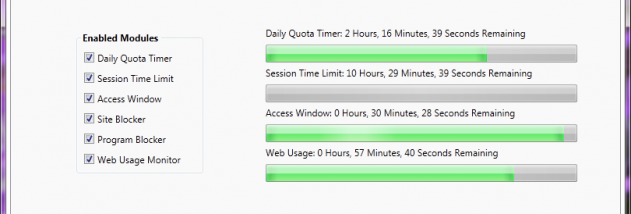
Romaco Timeout is a freeware computer-use limiter for households or other shared-computer settings where time at the keyboard needs to be controlled. It can limit how long a person uses a computer, restrict Internet access time, or define a daily period when the computer may be used. Its two main timing modes suit different needs: one tracks a user's accumulated use during the day, while the other limits the length of an individual login session.
In daily quota mode, Timeout sets a total time allowance for the day. Use this when a person may sign in more than once but should have a fixed overall amount of computer time. The limit applies to accumulated use rather than treating each login as a fresh allowance. Session mode instead places a maximum length on one period of use, making it suitable when each sign-in should have a defined endpoint regardless of how much time was used earlier.
Timeout can also restrict Internet usage or establish a permitted window for computer use. These controls address different scheduling needs: a daily allowance governs total time, a session limit governs a single login, and a time window defines when access is permitted. The program is intended for restrictions on a computer, rather than for tracking activity or reporting how the computer is used.
Parents can use the limits to set boundaries for a child's computer time, while the same controls may help manage access on a shared computer used by other people. A daily quota fits flexible routines in which use can happen at different times; a permitted window is more suited to fixed schedules. Session limits provide a straightforward option when the length of each login matters more than the total time across the day.
Romaco Timeout is freeware and requires .NET Framework 4. Its published operating-system support covers older Windows releases through Windows 8; Windows 10 and Windows 11 compatibility is not established here. It is a focused utility for applying time restrictions, not a general parental-control suite, and the available feature information does not establish additional monitoring or reporting functions.