Text Filter
Text Filter is a lightweight desktop utility for reading and searching text files. It is suited to people who need ... they are easier to spot in the remaining text. Search behavior can be adjusted to the task. The ...

RuneText is a lightweight plain-text editor with extra tools for everyday editing. It can change text to uppercase or lowercase, reverse text and count words. The bottom Runebar provides access to these functions, ten background color skins and program information. Users can hide or reposition the bars to adjust the workspace. The freeware program was made for older Windows releases.
| Author: | Runecats |
| License: | Freeware |
| Price: | FREE |
| Released: | Apr 8, 2011 |
| File size: | 256 kB |
| Downloads: | 302 |
| Keywords: | editor, reverse text tool, x64 software, plain text editor, RuneText, txt, change text case, count word, free text editor, lightweight text editor, text editor, word count editor, edit text, Windows 10 application, advanced notepad replacement, text, Runecats, text editing software |
| Author URL: | http://www.runecats.com/ |
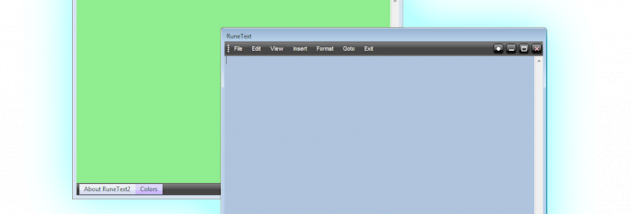

RuneText is a lightweight text editor from Runecats for creating and editing plain-text documents. It offers a more configurable interface than a basic editor, while keeping common editing tools close at hand. Its small footprint and straightforward controls suit users who want simple text editing with a few additional utilities rather than a feature-heavy writing suite.
The editor includes tools for changing letter case, which can convert selected text or text in a document to uppercase or lowercase. A reverse-text option rearranges text in reverse order, useful for quick transformations without copying content into another tool. RuneText also includes a word-count function, making it easier to check document length while drafting or reviewing text.
A Runebar sits along the bottom of the window and provides access to word count, color skins and program information. Its visibility can be toggled in the settings, and the menubar and Runebar can be repositioned through the menubar. The color menu offers ten background skins, allowing users to change the editor's appearance without affecting document content. A special option for writing letters is also included.
RuneText can be used for notes, short drafts, plain-text files and quick text transformations. The word-count feature helps with length checks, while the case and reversal tools handle small editing tasks directly in the editor. Its interface options let users keep the auxiliary bar visible for frequent access or hide it when more space for text is preferred.
The program is freeware and was developed for older Windows releases, including Windows 2000, XP, Vista, 7 and 8. Compatibility with Windows 10 and 11 is not established by that platform information, so users should verify that it runs as expected on their system before relying on it.