Schedule Wizard for Windows 10 - Full description
Schedule Wizard combines task automation with personal information management for people who want one desktop tool to organize appointments, reminders, to-do items and routine computer tasks. Its scheduling wizards guide users through common setup steps, while configurable options support more detailed schedules. Tasks can be arranged in categories, making it easier to separate work, household and other activities.
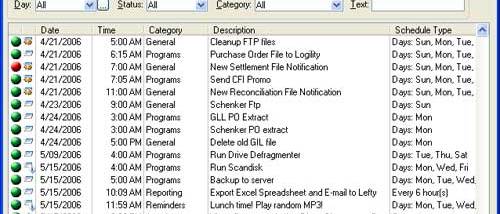
The scheduler handles one-time events as well as recurring tasks, with exceptions for dates when a regular schedule should not run. Advanced warnings provide notice of upcoming events, and Quick Start offers a VCR-like way to start tasks. For special occasions or schedule changes, tasks can be rescheduled without rebuilding them from scratch. Users can review all scheduled tasks, a single day, a category, or results matching custom criteria.
Beyond reminders, the program can automate system tasks and interact with other applications. Its scripting controls can send keystrokes and DDE commands; simple controls suit common actions, while advanced scripts provide more control. Scripting is limited to the 32-bit version. System-wide hot keys can trigger text or scripted tasks on demand, and Internet-related features allow scheduled email checking and message sending. The program also includes a contact manager, clipboard manager and to-do list, alongside reports for scheduled tasks and to-do items.
Import, export and synchronization tools support moving or coordinating information, while a ZIP-compatible backup and restore utility helps preserve stored data. These features make Schedule Wizard useful for people managing personal reminders as well as small-office routines, recurring computer tasks and information that needs to be available alongside a schedule. Categories and report views help keep larger task lists organized, and the combination of manual hot-key actions and timed automation accommodates both immediate and planned work.
Schedule Wizard is trialware and is intended for Windows systems, with Windows 10 among its supported operating systems. It is designed to use relatively few system resources. The included scheduling and information-management tools can be used independently or together, depending on whether the main need is timed automation, reminders, contacts, clipboard storage or task tracking.