Free Animated Presentation Tool
Welcome to the ultimate destination for Windows 10 users seeking a remarkable software experience! Discover the extraordinary "Free Animated Presentation Tool" developed by the ingenious minds at focusky.com. This ...

Welcome to the official download page of ScreenToVideo, an exceptional software developed by Aladni Software for Windows 10. This innovative tool empowers you to effortlessly capture, edit, and share high-quality screen recordings with ease. With its intuitive interface and comprehensive features, ScreenToVideo is the ultimate solution for creating professional videos, tutorials, presentations, and more. Experience the power of ScreenToVideo today and unlock your creativity like never before.
| Author: | Aladni Software |
| License: | Shareware |
| Price: | $119.00 |
| Released: | Feb 21, 2022 |
| File size: | 17.98 MB |
| Downloads: | 88 |
| Keywords: | video editor, Windows 10, presentation software, tutorial tool, demo tool, screen recorder, software, tutorial software, screen capturing, demo software, presentation tool, screen capture, ScreenToVideo, video recording, x64 |
| Author URL: | https://screentovideo.com |
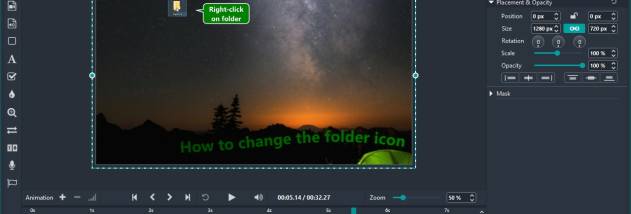
Welcome to the official download website for ScreenToVideo, an innovative software developed by Aladni Software exclusively for Windows 10 users. With ScreenToVideo, unleash your creativity and transform your screen recordings into captivating videos effortlessly. This powerful tool offers a seamless experience, allowing you to capture, edit, and share your screen recordings with ease. Whether you are a professional content creator, educator, or simply want to enhance your presentations, ScreenToVideo provides an intuitive interface and a wide range of features to bring your ideas to life. From recording high-quality videos to adding annotations, effects, and transitions, this software offers endless possibilities for customization. With its advanced editing capabilities, you can trim, merge, and enhance your recordings, ensuring a polished final product. ScreenToVideo also supports various audio options, enabling you to add voiceovers, background music, or system sounds to your videos. Sharing your creations is a breeze, as this software allows you to export your videos in multiple formats, including popular ones like MP4, AVI, and WMV. Whether you want to upload your videos to social media platforms, share them with colleagues, or embed them in presentations, ScreenToVideo has got you covered. So why wait? Download ScreenToVideo now and unlock the full potential of your screen recordings on Windows 10.