Audacity for Windows for Windows 10 - Full description
Audacity is a free, open-source audio editor and recorder for people who need to capture sound, work with existing recordings, or prepare audio for sharing. It supports multitrack editing, letting users arrange several clips and tracks in one project, and provides tools for shaping recordings without requiring a dedicated hardware studio. Its controls and editing functions suit everyday tasks such as trimming a spoken recording as well as more involved music and audio work.
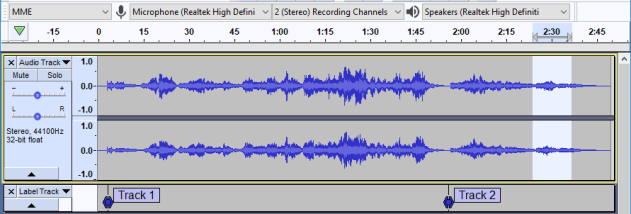
The program can record live audio through an available input device, with a Device Toolbar for selecting recording and playback inputs and outputs. Timer Record can start a recording at a scheduled time, while per-track level meters in Mixer Board help monitor signal levels. Once audio is captured or imported, clips can be cut, copied, moved, spliced, and mixed together. Users can also change a recording's speed or pitch, which is useful for creative adjustments or working with material that needs to match a particular pace.
Audacity works with common formats including WAV, AIFF, Ogg Vorbis, MP3, and FLAC. Its effects include tools such as reverb, delay, compression, equalization, noise removal, and normalization. Beat analysis can help estimate a passage's tempo, and label tracks provide a way to mark sections or organize editing. Keyboard controls and shortcuts support precise selection and track manipulation, while Sync-Lock can keep related tracks and clips aligned during edits. Plug-in support, including VST and Nyquist, adds options for processing and analysis.
Typical projects include digitizing tapes or records, cleaning up voice recordings, assembling audio clips, mixing tracks, and exporting files for playback or further production. Optional FFmpeg support extends import and export options to formats such as AC3, M4A, and WMA, and can allow audio to be imported from video files. Automatic crash recovery can help restore work after an unexpected program interruption.
Audacity is distributed as free software under the GNU General Public License. The Windows edition is intended for Windows systems, including Windows 10 and Windows 11. Available recording devices and plug-ins depend on the computer and installed components; optional format support may require the relevant library. Its broad format and editing support makes it useful for home recording, podcast preparation, audio restoration, and general-purpose sound editing.