AnyCam
... to the download page for AnyCam, a cutting-edge Windows 10 software developed by OneZeroFlow. Designed to revolutionize your webcam experience, AnyCam offers a seamless and ...

SCWebCam captures a computer display at timed intervals and can upload the images to an FTP server, creating a webcam-like view of a desktop without a camera. It can capture the full desktop, active window, or primary monitor, save JPG, PNG, or BMP images, resize them, add text captions, and optionally include frames from a compatible video device. FTP bandwidth limits, upload rotation, local-only operation, and a built-in web server provide several ways to publish or manage captures.
| Author: | Harmlesslion |
| License: | Freeware |
| Price: | FREE |
| Released: | Jan 21, 2016 |
| File size: | 522 kB |
| Downloads: | 330 |
| Keywords: | desktop webcam software, screen capture, SCWebCam, webcam capture, Capture, upload screenshot, uploader, Windows 10, ftp image uploader, screen capture web server, automatic screenshot ftp, Screen Capture, graphic capture, screen capture uploader, Harmlesslion, screenshot, x64 software, timed screen capture |
| Author URL: | http://www.harmlesslion.com |
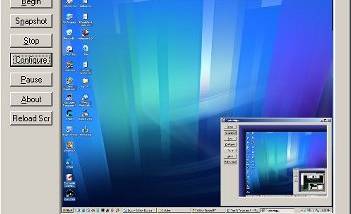



SCWebCam turns a computer display into a webcam-style feed by capturing screen content and optionally uploading the resulting images to an FTP server. It is intended for users who want to publish a changing view of their desktop, create a simple remote status display, or monitor a computer without pointing a camera at its screen. When a compatible video capture device is available, SCWebCam can include still frames from that source alongside screen captures.
Captures can be taken automatically on a configurable timer, with a choice of the full desktop, the active window, or the primary monitor. Images can be saved as JPG, PNG, or 24-bit BMP, resized by percentage or pixel dimensions, and optionally accompanied by a thumbnail. For JPG and PNG, image quality can be adjusted; several resizing methods let users balance processing speed against image quality. Captions can add text in a chosen font, color, and position, while reduced-priority capture modes help limit the program's effect on other work, including games.
SCWebCam can send images to an FTP server, limit upload bandwidth, and rotate a set of uploaded files to avoid keeping only a single, ever-overwritten image. It can also run locally without FTP, or use its built-in web server to serve a desktop image or a small web page directly from the computer. A scripting system provides control over image processing and upload steps, with sample scripts available for users who do not want to write their own. A preview window can display a video source while the program captures frames from it.
For unattended operation, the application can minimize to the system tray, show a capture countdown, and provide a one-click pause. It can detect a screen saver, a locked workstation, or a logoff or shutdown and upload a designated offline image in response. Optional startup settings can launch it automatically, and experimental modem-connection detection can restrict operation to periods when a modem is connected. A password lock can protect configuration settings, while event and error logs record information useful for troubleshooting.
SCWebCam is freeware. Its documented operating-system support covers older Windows releases, so compatibility with current Windows installations should be checked before relying on it. The interface includes tabbed settings, contextual help, and readable error messages to assist with setup. The installer prepares the program for first use; an FTP destination and credentials are needed for remote uploads, but local capture and the built-in web server can be used without that upload step.