SharePoint Alert Reminder Boost
SharePoint Alert Reminder Boost is a workflow notification tool for organizations that manage lists and content in SharePoint. It sends alerts when an item is created, ...

SharePoint Password Change adds two web parts to SharePoint portal sites. The Password Change Web Part detects the user's domain and account name, then lets the user submit a new password after entering the current password and confirming the replacement. It reports errors for an incorrect current password or a password that fails the site's policy. A second web part warns users before their passwords expire and links to a configured change page. Page editors set the warning period and destination URL.
| Author: | BoostSolutions Co., Ltd. |
| License: | Trialware |
| Price: | $199.00 |
| Released: | Mar 3, 2014 |
| File size: | 819 kB |
| Downloads: | 259 |
| Keywords: | system compatibility, sharepoint password change, change SharePoint password, sharepoint portal password tool, password expiration alert, password management, change, SharePoint integration, SharePoint, sharepoint password expiry warning, secure authentication, change domain password, modify SharePoint password, BoostSolutions software, SharePoint password changer, sharepoint password web part, user-friendly interface, password |
| Author URL: | http://www.boostsolutions.com/ |
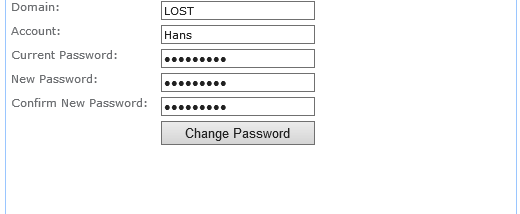

SharePoint Password Change is a pair of web parts for SharePoint portal sites, giving users a way to manage their domain account passwords from pages within the portal. It is intended for organizations that want to let users change passwords themselves and receive advance notice when passwords are approaching expiration, without relying on an administrator to handle each request.
The Password Change Web Part provides a form for changing an account password. When a user opens a page containing the web part, it detects the user's domain and user name. The user enters the current password, a new password and a confirmation, then submits the form. The web part checks the new password and sends the change request. If the current password is incorrect, or if the new password does not satisfy the site's password policy, it displays an error message so the user can address the problem.
The Password Expire Warning Web Part detects the user's domain, user name and account expiration date when the configured page is accessed. It displays a warning before the password expires and includes a link to a password-change page. Page editors can set how many days before expiration the warning appears and specify the destination URL through the web part's properties. This lets site administrators tailor the timing and direct users to the appropriate password-change workflow.
The two parts address separate steps in password maintenance: one prompts users to act before expiration, while the other provides the change form. A site can place the warning on a page users commonly visit and configure the change form on a destination page. This arrangement can make password maintenance available within the portal and reduce dependence on IIS expiration pages or administrator intervention for routine changes.
SharePoint Password Change is trialware from BoostSolutions Co., Ltd. Its functions depend on being deployed and configured as web parts on SharePoint pages, including setting the warning period and password-change URL. The product information lists support for Windows XP, Vista, 7 and 8; it does not establish compatibility with newer Windows releases or specify SharePoint edition requirements.