Smart Alert Pro for Windows 10 - Full description
Smart Alert Pro is a SharePoint notification component for teams that need more control over alerts than basic item-change messages provide. It lets users define which changes matter, who should receive a notification and when it should be sent. By filtering alerts to relevant events, it can help reduce unnecessary email while keeping people informed about changes to SharePoint content.
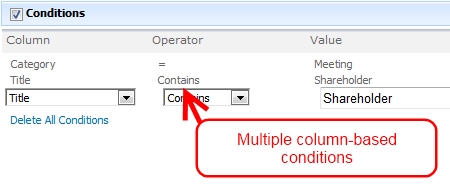
Alerts can be triggered when an item is added, modified or deleted, or according to a date. Multiple conditions can be combined so that a notification is sent only when the specified criteria are met. This is useful for tracking particular records or changes rather than sending the same alert for every update. Timed notifications also support date-based reminders, making the component suitable for workflows where a record becomes relevant on a particular day.
Recipients can be individual users or groups, including external contacts. Notifications can also be sent to addresses held in a Contacts list. Administrators or site users can create their own email templates, tailoring the message content to the audience and purpose of each alert. Files and documents can be attached, allowing a notification to carry related material alongside the message. When used with Smart List Pro, alerts can be added to forms, connecting notifications more closely to the way information is entered.
The component is integrated into the SharePoint interface rather than being a web part that must be placed manually on pages. This makes it suited to organizations that want alert configuration available as part of their SharePoint environment. Typical uses include notifying a team when selected list records change, sending date-based reminders, and routing updates to a group or contact list. Conditions and customized templates help distinguish these notifications from broad, generic alerts.
Smart Alert Pro is trialware from Infowise Ltd. Its stated SharePoint integration covers SharePoint 2007 and SharePoint 2010; it is not presented as a general-purpose desktop notification app. The download is approximately 5 MB. Although Windows 10 and Windows 11 appear among its listed operating systems, the component's stated function is to extend alerts within SharePoint, so deployment depends on the relevant SharePoint environment.