SoftPerfect Ping Monitor

SoftPerfect Ping Monitor 26.8

Monitor host uptime, latency and packet loss

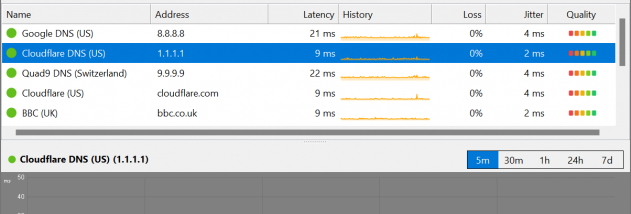
SoftPerfect Ping Monitor continuously checks network hosts with ICMP ping and tracks latency, packet loss and jitter. Results appear in a sortable table with sparklines, a configurable tile grid or a hop-by-hop route trace. Status thresholds, desktop notifications and optional sound alerts help identify outages and degraded connections. Interactive charts cover five time ranges, and 24-hour heat strips reveal stability patterns. Data is stored locally in SQLite. Freeware for Windows, macOS and Linux.

SoftPerfect Ping Monitor 26.8 details

Author:
License: Freeware
Price: FREE
Released:
File size: 6.28 MB
Downloads: 23
Keywords: icmp monitoring tool, packet loss monitor, icmp, windows, monitoring, monitor, network latency monitor, sparkline, loss, softperfect, host uptime checker, traceroute, jitter, network, latency, ping monitor, network route trace, packet, host, linux, uptime, ping, macos
Author URL: https://www.softperfect.com
SoftPerfect Ping Monitor screenshot
SoftPerfect Ping MonitorTrace & Ping ToolsLinux, macOS, Mac OS X, Mac Other, Windows 7 x32, Windows 7 x64, Windows 8, Windows 10, Win10 x64, Windows 11, WinServer, WinOther, Windows Server 2008r2, Windows Server 2012, Windows Server 2019, Windows Server 2022

User Rating: 5.0 (1 vote)

Windows 10

x32

Windows 10

x64

SoftPerfect Ping Monitor for Windows 10 - Full description

SoftPerfect Ping Monitor is a desktop network utility for administrators and anyone who needs to keep track of host availability and connection quality. It continuously sends ICMP ping requests to selected hosts, recording response times, packet loss and jitter. This makes it useful for checking local devices, remote servers, internet connections and other network endpoints over time rather than relying on occasional manual tests.

The monitor presents results in three views suited to different tasks. Its sortable table shows host status and measurements alongside sparklines, making it easier to compare several targets and spot changing performance. A tile grid gives each host a visual status indicator and can be arranged in three sizes for different amounts of screen space. The route-trace view displays the hops between the monitoring computer and a destination, helping identify where a connection path may be slowing down or failing.

Thresholds can be configured to classify a host as good, degraded or critical, so the status reflects the standards relevant to a particular network. Desktop notifications and optional sound alerts report when a host goes offline, its condition deteriorates or it recovers. Interactive latency charts show measurements across five time ranges, from five minutes to seven days, while 24-hour quality heat strips make patterns of instability easier to recognize. These views help distinguish a brief interruption from recurring loss or a sustained rise in latency.

The collected measurements are stored in a local SQLite database, allowing users to review monitoring history without relying on an external service or subscription. The combination of live status, historical charts and route tracing supports several workflows: checking an ISP connection, watching remote server uptime, investigating gaming latency, surveying connectivity to geographically distributed hosts, or keeping an eye on devices in a home lab. Monitoring multiple targets in one interface can also help narrow down whether a problem affects a single host or a wider part of the network.

SoftPerfect Ping Monitor is freeware and is available for Windows, macOS and Linux. Windows builds support 32-bit and 64-bit systems as well as ARM64; the program is also suitable for the Windows 10 and Windows 11 environments. It uses ICMP, so host responses depend on the target network allowing ping traffic. The application works as a desktop monitor, with alerts and local data available on the computer where it runs.

SoftPerfect Ping Monitor for Windows 10 - Post your review