VisualRoute 2010 for Windows 10 - Full description
VisualRoute is a network diagnostics program for IT staff, network administrators and support teams investigating slow or failed internet connections. It combines traceroute, ping and reverse DNS results in a graphical report, helping identify where traffic slows down or stops between a computer and a destination. The report can help distinguish a problem on a local network or internet service provider from one farther along the route or at the destination.
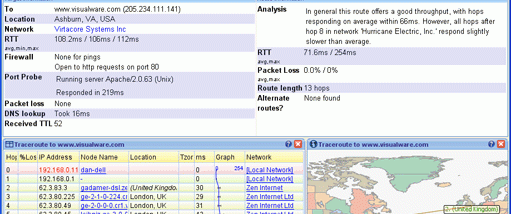
For each trace, VisualRoute displays the network hops between source and destination, with latency and packet loss information to show how performance changes along the path. Selecting a hop reveals additional details, making it easier to focus on a particular router or network segment. Ping and reverse DNS information add context to the trace, while IP location reporting places servers and routers on a map to help explain the route's geography and apparent efficiency.
The program also provides Whois lookups for domain and IP registration details, and network provider information that can help identify the organization responsible for a hop. Its OmniPath feature discovers multiple possible routes to a destination, which is useful when load balancing or router configuration sends traffic along different paths. Users can compare those paths by speed and packet loss. NetVu presents route topology across open trace reports, helping reveal shared nodes and alternative paths; it can also be used to monitor routes over time.
These tools are useful for diagnosing intermittent connectivity, documenting a route problem before contacting an internet provider, or investigating reports that a website or remote service is unreachable. In support workflows, the SupportPro edition can test connections in both directions between a support workstation and remote customer systems. Other editions cover different needs, from basic traceroutes to continuous or multi-point analysis, so available capabilities depend on the edition.
VisualRoute is trialware for Windows, with support listed through Windows 10, including 64-bit Windows 10. It is a desktop utility focused on network-path investigation rather than general browsing or system optimization. Its reports bring several diagnostic results together, giving technical users a practical way to examine where connection quality changes and gather information for follow-up with network providers or service operators.