Remote Process Viewer
... view of all active processes running on a remote computer. It's a must-have tool for IT professionals, system administrators, and tech enthusiasts alike. The Remote Process Viewer stands out for its simplicity and ...

Aspia is an open-source Windows remote desktop and file transfer application for accessing computers or providing remote support. It uses separate control console and host components, with connections organized in address-book groups. During a session, users can adjust color depth and compression, and transfer files by dragging and dropping or copying and pasting. Group settings can include a password and encryption.
| Author: | Dmitry Chapyshev |
| License: | Open Source |
| Price: | FREE |
| Released: | Oct 7, 2026 |
| File size: | 15.60 MB |
| Downloads: | 35 |
| Keywords: | File Transfer, Transfer, Remote Access, Remote Desktop, Access, Aspia free download, download Aspia, open source remote desktop, remote control application, file transfer utility, remote desktop access, Aspia, remote computer support, remote access software, Desktop, Remote |
| Author URL: | https://aspia.org/ |

Aspia is an open-source remote desktop and file transfer application for people who need to access or support Windows computers from another location. It uses separate software components for the control console and the remote host, so both sides can be prepared for a connection. This setup suits remote assistance, access to a work computer, and routine connections between machines in different locations.
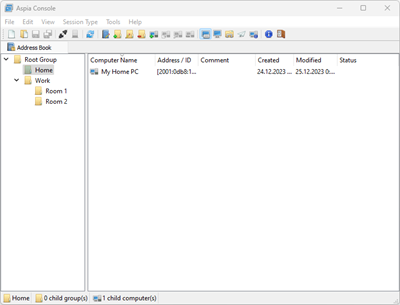
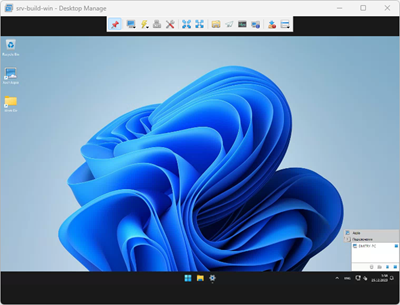
The address book organizes remote computers into groups, making it easier to keep multiple connections in order. Groups can be configured to use a password and encryption, helping administrators manage access settings for the computers they connect to. Once connected, the remote desktop session lets an operator work with the other computer as if it were nearby, which can be useful for troubleshooting or accessing applications and files on a distant workstation.
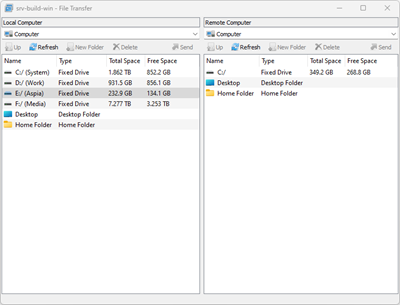
Aspia also includes file transfer within the remote session. Its transfer window supports moving files by drag and drop or by copying and pasting, so files can be exchanged without switching to a separate transfer tool. Session configuration options include color depth and compression ratio. Adjusting these settings can help tailor the session to the available connection or the visual detail needed for a task.
The combination of grouped connections, remote control, and file exchange makes Aspia useful for individual remote access as well as helping family members or colleagues resolve computer problems. The address book is particularly handy when connections need to be revisited, while the session toolbar provides access to transfer and display settings during work. Initial setup requires selecting and configuring the console and host components, after which saved connections can be organized for later use.
Aspia is free and open source. It supports Windows 10 and 11, along with several earlier Windows desktop editions and Windows Server releases, including Server 2012, 2016, 2019, and 2022. Compatibility covers both 32-bit and 64-bit editions where indicated for desktop systems. Its focus is on Windows remote access rather than a general-purpose cross-platform connection service.