BarChimes
... to the download page for BarChimes, an innovative Windows 10 software developed by Quikquak. BarChimes is a powerful and versatile tool designed to enhance your ...

Speak-A-Message records compressed voice messages for sharing by email, Facebook or cloud upload. It can add photos, screenshots and eCards, attach spoken comments to photos, and build audio slideshows. Recordings can include titles, private-message markers and sound effects, and can be played in common media players. Speech recognition can transcribe audio on supported systems.
| Author: | Inventivio |
| License: | Freeware |
| Price: | FREE |
| Released: | Jan 10, 2017 |
| File size: | 17.40 MB |
| Downloads: | 413 |
| Keywords: | Speak-A-Message, voice message recorder, speech to text recorder, record, audio messaging, audio slideshow maker, send audio message, send, Windows 10 software, record audio message, x64 application, playback audio message, voice message email, Inventivio, send audio messages, voice recording, playback, photo voice comments |
| Author URL: | http://www.inventivio.com/ |
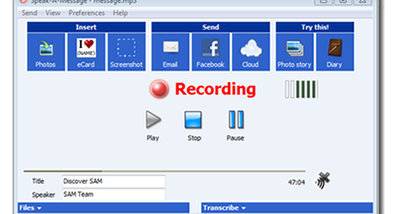

Speak-A-Message is a voice messaging program for people who want to share spoken notes, personal messages and photo commentary instead of relying only on written text. It records audio and prepares it for sharing, with tools for adding photos, screenshots and eCards. The program is freeware for personal use, and its compressed recordings are designed to keep message attachments manageable for recipients.
A recording can include an author and title, and messages can be marked private to indicate that they are intended for private playback or headphones. Audio compression keeps file sizes relatively small; a four-minute voice message takes about 500 KB. Recordings can be played in common media players, so recipients do not necessarily need Speak-A-Message to listen. Sound effects are also available for adding character to a voice message.
Photos can be paired with spoken comments, while multiple images can be assembled into an audio slideshow. These photo shows can be shared by email or on the web, and the program can convert them to Flash movies when an MP3 codec is available. It can resize photos automatically to help limit attachment size. Messages can be sent through a desktop email client or browser-based email, and an Outlook menu integration provides another route for creating and sending them. Audio messages can also be posted to Facebook or uploaded to cloud services.
Speech recognition can transcribe spoken messages into text on supported Windows systems; this feature is not available on Windows XP. Voice notes, comments and recordings of talks can also be added to PowerPoint presentations and Word documents, making the program useful for presentation narration, document feedback and personal recordings as well as email. The interface supports skins, which can be attached to voice messages; users can also create a skin from a picture.
Speak-A-Message runs on Windows and requires Windows Media Player 9 or later. MP3 recording and Flash movie creation depend on an MP3 codec. The program is free for personal use, and its combination of voice recording, photo commentary, slideshow creation and sharing tools suits people who want to make audio messages without producing large media files.