Database .NET
Database .NET is a database management tool for users who need to connect to ... as back up and restore them. A service manager provides access to database service controls within the ...

SQLiteSpy is a compact graphical manager for SQLite3 databases. Its schema tree lists tables, columns, indexes and triggers, while tables and views can be opened in a data grid for inspection and cell editing. Tabbed SQL editors let users run complete queries or selected statements, compare results and monitor execution time. Unicode input, REGEXP support and additional mathematical and compression functions extend its SQL tools. The self-contained freeware application runs on Windows 10 and 11.
| Author: | Ralf Junker |
| License: | Freeware |
| Price: | FREE |
| Released: | May 30, 2024 |
| File size: | 4.50 MB |
| Downloads: | 437 |
| Keywords: | Database Manager, sqlite sql query tool, sqlite database browser, Ralf Junker, sqlite table editor, sqlite gui editor, sqlite query analyzer, database management, SQLite editor, Manage Database, SQLiteSpy, Grid Cell Editor, Manage, sqlite database manager, Manager, Windows 10 application, Management, x64 software |
| Author URL: | https://www.yunqa.de/ |
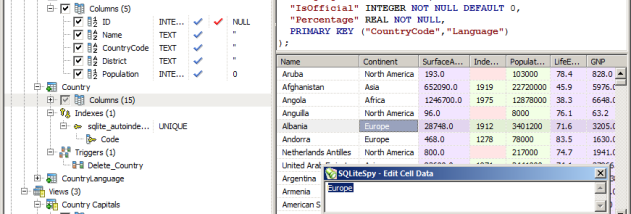

SQLiteSpy is a compact graphical database manager for opening SQLite3 files, inspecting their structure and working with their contents. It is suited to developers, analysts and other users who need to examine or change SQLite databases through a desktop interface, as well as run SQL without setting up a separate database server. The application includes its own SQLite engine in a single-file executable, so it does not require separate engine DLLs.
A schema tree presents the objects in an open database, including tables, columns, indexes and triggers. Users can refresh the tree, open a table or view to inspect its rows, and access common commands from the context menu. Table data appears in an editable grid: selecting a cell and invoking the editor allows a value to be changed and written back to the table. Different background colors distinguish native SQL data types, helping identify cases such as NULL values being mistaken for empty strings.
SQL workspaces use tabs, allowing multiple query statements and their results to remain available for comparison. Queries can be typed or loaded into an editor and run in full, or limited to the current line or selection. Execution time is measured automatically, which can help when comparing query performance. SQLiteSpy also supports Unicode in SQL commands and displayed or entered data, and adds REGEXP using Perl 5.10 regular-expression syntax.
Beyond SQLite's default functions, the application provides mathematical SQL functions for operations such as trigonometry, logarithms, powers, rounding and angle conversion. COMPRESS and UNCOMPRESS apply zlib deflate compression to text or BLOB values; integers, doubles and NULL values are returned unchanged. Its internal result storage uses SQLite's native data types, an approach intended to reduce memory use and handle large tables more efficiently. SQLiteSpy can also read and modify encrypted database files generated by DISQLite3; this encryption support is specific to that format and is not the same as support for SQLite Encryption Extension files.
SQLiteSpy is freeware for Windows, including Windows 10 and Windows 11. Its compact, self-contained design suits database inspection and SQL editing on a workstation or in a deployment where distributing extra database-engine DLLs is undesirable. Users working with encrypted files should confirm that those files were created with DISQLite3 encryption.