RADIO Player Pro
RADIO Player Pro is an audio playback and scheduling application for radio stations and broadcasters. It brings live streams, recorded programs, advertisements and jingles into a single ...

StationPlaylist Studio is audio playout software for radio broadcasters, Internet stations and automated music systems. DJs can run live-assist shows with microphone control, keyboard shortcuts, quick-access carts and an editable playlist. Automation mode supports continuous playback, timed events, track crossfading and voice-track overlap. It reads M3U playlists and works with StationPlaylist Creator for scheduled playlist generation.
| Author: | StationPlaylist.com |
| License: | Demo |
| Price: | $159.00 |
| Released: | Feb 23, 2026 |
| File size: | 15.60 MB |
| Downloads: | 386 |
| Keywords: | live assist radio software, broadcast automation software, radio broadcasting software, internet radio encoder, radio playlist player, radio playout software, internet radio station, audio playout system, automated music playback, automated broadcasting, radio, live assist, internet broadcaster, StationPlaylist Studio, stream, assist, radio broadcaster |
| Author URL: | https://stationplaylist.com/ |
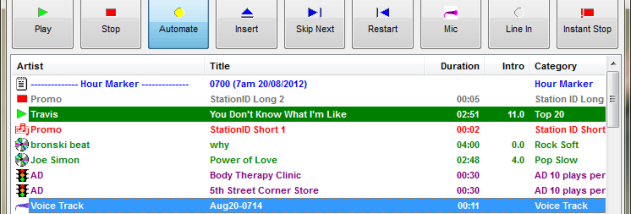



StationPlaylist Studio is digital audio playout software for radio stations, Internet broadcasters and other operators who need scheduled or live audio playback. It provides a live-assist interface for DJs as well as an automation mode for continuous, unattended operation. Large controls and keyboard shortcuts support common on-air actions, while internal player management handles transitions between tracks and other audio elements.
In automation mode, Studio can play a playlist continuously and trigger spots or other events at specified times. Its automatic crossfader blends tracks, and voice-track or song-intro overlapping can bring the next item in before the current one ends. DJs can control a microphone with music fading, manage external Line-In feeds manually or automatically, and play Internet streams such as news feeds. A live playlist can be edited during a show: tracks may be inserted, removed, moved, searched by artist or title, or dragged in from Windows Explorer. Ninety-six cart slots provide quick access to jingles and sound effects, with personalised carts available for announcer logins.
Studio works with playlists created by StationPlaylist Creator, which can schedule new playlists automatically; some of its advanced automation workflows rely on Creator. It can also read standard M3U playlists and operate as a DJ jukebox without a scheduler. Audio support includes MP2, MP3, AAC in MP4, Ogg Vorbis, WMA, WAV, AIFF and CD audio. For station output, it can encode Internet streams in AAC+, MP3, Ogg and WMA formats. A Now Playing page or text file can be generated and optionally uploaded to an FTP server. Logging tools help record information for royalty payments and advertisement billing, while time-of-day and temperature announcements can be played from separate audio files.
Additional studio controls include track preview on a second sound card, audio compressors and limiters, and integration with external equipment through an LPT port. Studio Monitor provides fail-safe redundancy, and automation can be configured to restart after a power failure. Password protection helps prevent unauthorised changes to options. These tools suit live radio production, scheduled broadcast playout, Internet radio and automated music playback in stores, where consistent playback and reduced manual handling are useful.
StationPlaylist Studio is offered as demo software. It supports Windows 10 and Windows 11, along with a range of Windows Server and earlier Windows releases. Its playlist and audio workflows can be used with or without StationPlaylist Creator, depending on whether scheduled playlist generation is needed.