PDF-XChange Editor
Welcome to the home of PDF-XChange Editor, a cutting-edge software developed by Tracker Software Products Ltd. This Windows 10 compatible software is your ultimate solution for all your ...

Szoter is a lightweight image editor for annotating pictures, screenshots and still webcam captures. It can capture the screen or webcam, open local and network images, and add lines, shapes, arrows, sketches and text comments. Users can also scale, rotate and crop images, then adjust annotation colors, outlines and sizes. A built-in browser supports browsing and switching into annotation mode. Finished images can be saved or shared without registration.
| Author: | Segfaultsoft |
| License: | Freeware |
| Price: | FREE |
| Released: | Jan 11, 2011 |
| File size: | 1.23 MB |
| Downloads: | 248 |
| Keywords: | photo editor, Szoter software, photo, screen capture tool, screenshot editor, image annotation software, annotate pictures, edit picture, Windows 10 compatible, add text to images, screenshot editing, annotate image, picture, Segfaultsoft developer, webcam snapshot editor, online application, annotation tool, editor |
| Author URL: | http://szoter.com/ |
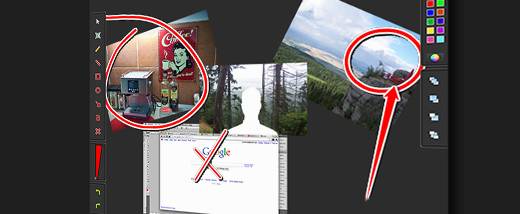

Szoter is a lightweight image editor for adding notes and visual marks to digital pictures, screen captures and still images from a webcam. It suits users who need to point out details, explain a screenshot or prepare an image to share, without a complex editing workflow or an account.
The program can capture the screen or take an image from a webcam, and it can open pictures from local storage or network locations. Once an image is loaded, users can scale or rotate it, crop the workspace and add annotations. Lines, rectangles, circles and arrows help identify areas or show relationships; freehand sketching is available for less regular shapes. Text comments can provide labels or context.
Annotation appearance can be adjusted through controls for color, outline and size, so marks and notes can be distinguished from the image underneath. The built-in web browser lets users browse pages in the desktop application and switch to annotation mode when they want to mark up an image or other visual material. Finished work can be saved or shared, and registration is not required.
Szoter is suited to quick visual explanations, such as highlighting an interface element in a screenshot, marking up a picture for discussion or adding comments to an image gathered online. It focuses on capture and annotation rather than advanced photo retouching. The program is freeware. Its published operating-system support includes Windows versions through Windows 10; Windows 11 support is not established here.