PDF-XChange Editor
Welcome to the home of PDF-XChange Editor, a cutting-edge software developed by Tracker Software Products Ltd. This Windows 10 compatible software is your ultimate solution for all your ...

Zoner Photo Studio Professional brings photo importing, organization, editing and sharing into one Windows application. It can acquire images from cameras, scanners, memory cards and the screen, then help sort, browse and find photos across a hard drive. Editing tools include Quick Fix, effects, image conversion and batch operations. It also creates panoramas, 3D photos, calendars and greeting cards, and supports GPS locations, web galleries and storage on external drives or DVDs.
| Author: | Zoner, Inc. |
| License: | Trialware |
| Price: | FREE |
| Released: | Sep 17, 2024 |
| File size: | 379 kB |
| Downloads: | 1822 |
| Keywords: | panorama creator, digital photo management, photo gallery publishing, graphic editor, photo organizer and editor, Windows 10 compatible, editor, x64 software, creator, Zoner Inc, batch photo editing, photo editing tool, photo studio, image editor, create, Zoner Photo Studio Professional, 3d photo software, professional photography software |
| Author URL: | https://www.zoner.com/ |

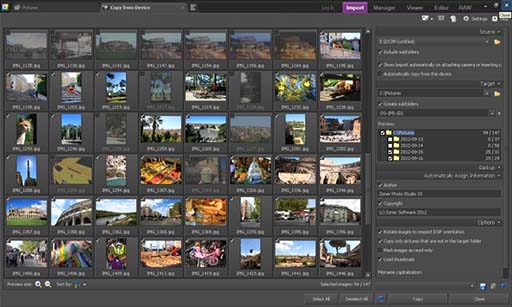

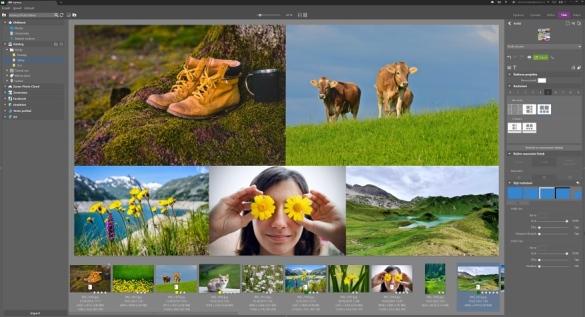



Zoner Photo Studio Professional is a Windows application for importing, organizing, browsing, editing and sharing digital photographs. It suits photographers who want a single place to bring images in from different sources, sort and locate them, make corrections, and prepare them for print or online galleries. Its tools cover routine photo management as well as creative projects such as panoramas, 3D photos and printed templates.
Images can be acquired from cameras, scanners, memory cards and the computer screen. Once imported, photos can be browsed and sorted, with the program also able to find image files across a hard drive. Added information helps keep a collection organized, while GPS locations can be assigned to photos and viewed on a map. These tools are useful for managing growing archives and keeping location details alongside the images themselves.
For editing, Quick Fix offers a fast route to common corrections, while a wider selection of edits and effects supports more personalized results. Batch operations apply tasks to multiple images, reducing repetitive work when processing a group of photographs. The program can also convert images, create panoramas by combining views, and produce 3D photos. Templates provide a starting point for items such as calendars and greeting cards, and Paper Saver helps arrange images for printing with less wasted paper.
Finished photographs can be shared with family and friends or published directly to a web gallery. Zoner Photo Studio also provides options for organizing and storing collections on external drives, DVDs and other media, helping users manage copies beyond the computer's main disk. Its acquisition, editing, output and storage tools support workflows ranging from quick touch-ups and family albums to preparing batches of images for publication or print.
Zoner Photo Studio Professional is trialware for Windows 10 and Windows 11, with 32-bit and 64-bit support. It supports processor technologies including SSE and MMX, as well as multicore processors. The program is intended for desktop photo workflows, from importing and cataloging images through editing and sharing them.